Mployer is pleased to announce the winners of its sixth annual Top Employee Benefits Consultant Awards for 2026, recognizing brokerage offices nationwide that deliver exceptional value and client satisfaction in employee benefits. The program highlights nearly 1,000 brokerage office locations, approximately 10% of offices nationally, that have demonstrated excellence in benefit strategy and client outcomes, underscoring the critical role advisors play in shaping the health, welfare, and employee experience of more than 160 million Americans.
Author:
September 10, 2026
NASHVILLE, Tenn., Sept. 10, 2026 /PRNewswire-PRWeb/ -- Mployer, the industry's leading employee benefits and insurance intelligence platform, today announced the winners of its sixth annual Top Employee Benefits Consultant Awards, recognizing a select 1,000 of the 15,000+ benefits brokerage and consulting office locations across the country.
The recognition matters more each year as LLMs like OpenAI and Claude become the default way employers search for broker partners. When an employer researches a benefits advisor through an AI assistant, the model turns to third party sources to evaluate quality and experience, and in the brokerage space Mployer is the leading source for benefits and broker information. Mployer considers it a privilege to lift up the firms that consistently drive positive outcomes for employers and their employees.
"Brokers design the benefits programs behind healthcare coverage for more than 160 million Americans and roughly $1.5 trillion in annual employer spend. Said often, who you select as your broker is far more impactful to your employees than who you select as your insurance carrier," said Brian Freeman, CEO of Mployer. "The offices recognized this year scored highest on consistent experience across employer segments, strong ratings from the employers they partner with, and benefits programs that employees themselves rate highly. Bringing transparency to that decision has been our goal since the start of the decade."
Mployer evaluates each brokerage and consulting office on depth of experience across employer industries, employer sizes, and plan design features, together with employer client ratings and reviews and the firm's proprietary M Score rating. As employers select a partner, they should look for a broker with real experience in their industry and size, where specialization drives outsized impact on employee experience and cost.
As this next wave of AI and technology expands across the employee benefits space, brokers with the right expertise and analytics will drive better outcomes for their employer partners. Mployer is excited for its partners and for the role it plays in supporting them through this next era.
The full list of 2026 winners is available at mployeradvisor.com/best-insurance-brokers. Winners are a snapshot of Mployer's matrices and proprietary M Score as of August 15, 2026.
About Mployer
Mployer is the industry's leading employee benefits and insurance intelligence platform, built for brokers, carriers, GAs, PEOs, and the employers they serve. Powered by more than 2 billion unique benefit data points and Anthropic, Mployer's suite of Catalyst, Insights, Vista, Pulse, and Atlas works for industry leaders benchmarking plans, analyzing claims, recommending growth strategies, and interpreting complex policies and legislation, in one platform. With its MCP Server and Claude Connectors, Mployer's data and AI are accessible across its products and directly within Claude. Learn more at MployerAdvisor.com.
Media Contact
Anthony Waters, Mployer, 1 (844) 743-6456, [email protected], MployerAdvisor.com
This month, Catalyst makes prospecting and outreach easier with AI-powered email creation, more powerful search filters, improved industry and Workers' Comp data, broader access to Mployer data through AI assistants, and improvements to Advanced Analytics.
September 2026 Product Updates: Catalyst and Insights+
Each month, we introduce updates across Catalyst and Insights+ designed to make your workflow faster, reduce manual work, and put Mployer data where you need it.
This month, Catalyst makes prospecting and outreach easier with AI-powered email creation, more powerful search filters, improved industry and Workers' Comp data, broader access to Mployer data through AI assistants, and improvements to Advanced Analytics.
Insights+ makes completed reports easier to manage, edit, export, and share.
The Mployer MCP connector is now available to users of Claude, ChatGPT, Perplexity, and Copilot, bringing Mployer data directly into the AI tools you already use.
Here’s what’s new.
Catalyst
AI email composer. Write an outreach email to any contact without leaving Catalyst. Choose a purpose such as an intro, follow-up, insight share, or your own prompt. Select the Mployer data you want to use and set the desired length. Catalyst generates an editable subject and email body using real Mployer data.
Contact filters on every search page. Universal, Employer, Broker, Commercial P&C, PEO, and Retirement searches now include Contact Filters. Filter contacts by name, title, seniority, department, or tags without leaving your search. The Company/Contact toggle has also moved to the top left of the results.
More precise industry search. Search results now use each company’s primary industry rather than blending all associated industries. Snapshots show the primary industry first, with related industries listed separately. A new filter lets you include related industries when needed, and large industry selections now run more reliably.
Mployer data in more AI assistants. The Mployer MCP connector is now available to Claude, ChatGPT, Perplexity, and Copilot users. It includes a streamlined sign-in flow and access scoped to each user’s Mployer entitlements.
166 new AI search filters. New filters cover retirement plan ratings, compliance and violation trends, premium-vs-market comparisons, broker and carrier tenure, and more. We also improved filter reliability and corrected date handling for “recent” questions.
Search companies and people together. Catalyst’s AI assistant can now connect people to their employers in a single question. For example: “Find the CFOs at employers with a low benefit rating.”
Advanced Analytics improvements. Advanced Analytics is available as a beta feature and now lets you drill down from any search result to employer and contact details without leaving the tool, export your current view as a PDF with active filters applied, and search by parent broker or broker location. To see the new updated version of Advanced Analytics, turn it on in your beta features.
Improved Workers’ Comp policy data. Carrier, broker, and industry details now remain consistent across every location and state associated with the same policy number. The Consolidated Policy Details grid is now out of beta and is the default Workers’ Comp Policies view.
Standardized exports. Contact exports now include the same company fields as Company exports. Company exports also include the 5500 signer’s email, and exports now use consistent header colors and hyperlink formatting.
Insights+
Manage Pages on completed reports. Reorder pages, hide or restore pages, or add pages from your own PDFs without rebuilding the report. Your saved page order carries through to the HTML view, PDF, PowerPoint, and emailed report. Scoring and award qualification are unaffected.
Edit directly on the report. Change plan values directly from the HTML report without reopening the full request. Submitted values become editable, a counter tracks your changes, and scores, breakdowns, and award status recalculate when you submit. Benchmarks, cohort inputs, and scores remain read-only.
Excel downloads. Download any completed report as a single-tab Excel workbook. Each submitted plan has its own column, with Cohort and National benchmarks in their respective columns. Excel downloads are now available to all brokers.
Shareable award pages. The Download Award flow now generates a branded page for the employer with the one-page benefit summary, social templates, press release templates, and award badges. No login is required. The link is automatically disabled if the report is edited after the page is created.
Switch from manual entry to document upload without losing your work. Employer, cohort, rate, and contribution data already entered in the manual form now carries into the document upload flow and prefills where applicable. Document processing also runs server-side, so closing the browser tab no longer restarts processing.
Five more voluntary questions now prefill from documents. Hospital indemnity, cancer insurance, pet insurance, student loan assistance, and FSA information can now be populated automatically from an uploaded benefit guide.
Please reach out to [email protected] with any questions or if you want an in-depth walkthrough of the updates.
According to Mployer Insights’ 2026 analysis of 76,000+ employer benefit plans, basic group life insurance achieves near-universal participation with an 83% employer offer rate and a 97% employee enrollment rate, driven by the fact that 96% of basic plans are noncontributory (100% employer-paid). While 47% of employers structure life insurance as a variable multiple of earnings—with 1x salary serving as the dominant national standard (62% of multiple-based plans)—flat-dollar benefit options vary widely from $8,500 (10th percentile) to $48,793 (90th percentile). Additionally, 92% of employers offer employee-paid voluntary life insurance to allow workers to bridge the gap toward the recommended 10–12x salary coverage target.
Author:
August 30, 2026
2026 Benefits State of the Union: Life Insurance
Why Employers Offer Life Insurance (And Why It Matters More Than They Think)
Life insurance is not legally required of private employers. There is no federal mandate compelling you to offer it. And yet 83% of employers do. That near-universal adoption is not driven by regulation. It is driven by the recognition that a basic life insurance benefit is one of the clearest signals an employer can send about how it views its relationship with the people who work there.
At its core, employer-sponsored group life insurance provides a death benefit to an employee’s designated beneficiaries if that employee dies while covered under the plan. For most employees, particularly those with families and financial dependents, that coverage represents real peace of mind. It costs the employer relatively little to provide. It means a great deal to the employee who has it. And when it is absent, employees notice, especially those at stages of life where financial protection for their families is a priority.
This post approaches life insurance from the employer’s perspective: what you are providing, how to structure it, what the market looks like, how to explain it to your workforce, and what questions to ask at your next renewal. Life insurance rarely wins a job offer on its own. But it is a visible component of a benefits package that candidates and employees evaluate as part of the whole picture.
What You Are Actually Offering: Key Terms and Plan Types
Understanding the vocabulary of group life insurance is the starting point for making good decisions about it and communicating clearly about it to employees.
Group term life insurance. The most common form of employer-sponsored life insurance. The employer purchases a group policy from a carrier, and all eligible employees are covered under the same contract. Coverage lasts only while the employee is actively employed and enrolled in the plan. There is no cash value and no investment component. It is pure death benefit coverage.
Noncontributory (employer-paid). The employer pays 100% of the premium. 96% of employer-sponsored basic life plans are noncontributory, according to Mployer’s data. This is the standard structure for basic life coverage and is generally expected by employees as a baseline benefit.
Contributory (employee-paid or shared). The employee pays part or all of the premium. Voluntary life insurance, offered by 92% of employers, is typically structured this way. Employees elect to purchase additional coverage beyond the employer-provided basic amount, at group rates that are typically lower than what they could obtain individually.
Face amount / death benefit. The dollar amount paid to beneficiaries upon the employee’s death. This is the number that matters most to employees and their families. How you set this amount, and whether it keeps pace with wage growth, determines whether the benefit is actually meaningful.
Flat dollar benefit. The benefit is set as a fixed dollar amount for all covered employees, regardless of salary. 36% of employers use this structure. Simple to administer and communicate, but can become inadequate over time if the flat amount does not increase as wages do.
Multiple of earnings (variable % of earnings). The benefit is set as a multiple of the employee’s annual salary, for example 1x or 2x pay. 47% of employers use this structure. Scales automatically with compensation, which means higher-paid employees receive proportionally more coverage without plan amendments.
Accidental death and dismemberment (AD&D). A supplemental benefit that pays an additional amount, or a portion of the face amount, if the employee dies as a result of an accident or suffers a qualifying injury such as loss of a limb or vision. Often bundled with basic life coverage. The median AD&D benefit at the 50th percentile is $300,000; at the 75th percentile it reaches $500,000.
Portability. One of the most valuable but least-communicated features of group life insurance. Portability allows a departing employee to continue their group life coverage after leaving employment, converting the group policy to an individual policy or taking a portable term policy, without having to prove insurability. This matters enormously to employees who have developed health conditions while employed and might not qualify for individual coverage on the open market. Employers who offer portable group life and communicate that feature at onboarding are providing real financial protection that extends beyond employment. Not all group life plans offer portability, and the terms vary by carrier. This is worth confirming and communicating explicitly.
Offer Rates: Basic Life and Voluntary Life
83% of employers offer basic employer-paid life insurance nationally. Among those employees whose employers offer it, 97% are enrolled, one of the highest participation rates of any benefit. That near-universal enrollment reflects how employees treat basic life insurance: when it is offered at no cost, virtually everyone accepts it. 96% of basic life plans are noncontributory, meaning the employer absorbs the full premium cost.
Voluntary life, offered by 92% of employers, allows employees to purchase additional coverage beyond the employer-paid basic amount. Voluntary life is typically employee-paid at group rates, which are generally lower than individual market rates and, critically, often available without medical underwriting up to a guaranteed issue amount. For employees who want more than 1x salary coverage or whose family situation warrants higher protection, voluntary life is how they get it without going through individual underwriting. Offering voluntary life costs the employer very little in direct dollars, since employees fund it themselves, but it adds meaningful value to the benefits package and is worth communicating clearly at open enrollment.
How the Benefit Is Structured: Flat Dollar vs. Earnings Multiple
Nearly half of employers set life insurance as a variable percentage of earnings, typically expressed as 1x, 2x, or another multiple of annual salary. About a third use a flat dollar amount. The choice between these two structures has meaningful implications for both the employer and the employee.
Flat dollar plans are simple to administer and easy for employees to understand. A $50,000 life insurance benefit is a $50,000 life insurance benefit. The limitation is that a flat dollar amount set years ago may have become inadequate as wages and inflation have risen. An employee earning $90,000 with a $25,000 flat life insurance benefit has coverage that would not cover a year of their salary. Flat dollar plans should be reviewed periodically against wage growth, not just against the carrier market.
Earnings multiples scale automatically. When an employee receives a raise, their life insurance coverage increases proportionally without any plan amendment or administrative action. For employers with meaningful variation in compensation across the workforce, an earnings multiple ensures that the benefit stays proportionally relevant for all employees. The tradeoff is slightly more complexity in administration and in communicating the benefit to employees who need to understand that their coverage changes with their pay.
Among flat dollar plans, the range is significant: from $8,500 at the 10th percentile to $48,793 at the 90th percentile. An employer with a $10,000 flat dollar benefit is offering a benefit that does not cover even a quarter of the median household income. That is a visible gap to employees who are evaluating their financial protection.
The Earnings Multiple Market: One Times Pay Dominates
62% of earnings-multiple plans use exactly 1x salary as the benefit level. 21% use 2x, and 13% sit between 1x and 2x. Only 3% go above 2x salary.
1x salary is the market standard, but it is worth being honest with employees about what that means in practice. Financial planning guidance consistently suggests that individuals need 10 to 12 times their annual income in life insurance to adequately protect dependents over the long term. 1x salary covers roughly one year of income replacement before an employee’s family needs to find another source of financial support. For an employer, providing 1x salary as a baseline and offering voluntary life insurance for employees who want more is a reasonable and common approach. What matters is communicating both clearly: here is what the company provides, and here is how you can supplement it if your situation warrants it.
The maximum benefit cap data shows wide variation across the market. The median maximum benefit under earnings-multiple plans is $321,154, but this rises steeply toward the top: $693,182 at the 75th percentile and $1,416,667 at the 90th percentile. These high caps are most common among plans designed for organizations with significant executive or high-income populations, where a 1x or 2x multiple on a high salary generates a large face amount. Setting an appropriate maximum benefit is a plan design decision that affects both cost and equity across the workforce.
Portability and Communication: Two Places Most Employers Fall Short
Two of the most underutilized dimensions of employer-sponsored life insurance are portability and active communication. Both represent real value that most employees never fully receive because employers do not proactively surface them.
Portability
When an employee leaves your organization, what happens to their life insurance coverage? In most group plans, it ends. But many group life plans offer portability, the option for a departing employee to convert their group coverage to an individual policy or take a portable term policy with them, without having to go through medical underwriting again. For an employee who has developed diabetes, heart disease, or any other condition while employed, this feature can be the difference between being able to obtain affordable life insurance and being priced out of the individual market entirely.
Portability terms vary by carrier and plan design. Some plans allow full portability of the basic benefit; others allow conversion only. Some require the employee to act within 31 days of separation. Employers who know what their plan offers and communicate it proactively at offboarding, not just in the fine print of a benefits guide, are delivering real value to departing employees at a moment when that information is most useful.
Communication
Group life insurance has a 97% enrollment rate when offered at no cost, but a significantly lower rate of employee understanding. Most employees know they have life insurance through their employer. Very few know the face amount, whether it is set as a multiple of their salary, what their current death benefit would be, whether they have AD&D coverage, or whether the plan is portable. The annual open enrollment period is the most reliable moment to give employees a clear, plain-language statement of what they have: your current life insurance benefit is X dollars, which represents approximately Y months of your salary, and you have the option to increase your coverage to Z through voluntary life.
This is not just an employee wellbeing gesture. It is an employer brand decision. Employees who understand and appreciate their benefits are more likely to value their total compensation accurately, which affects retention.
The Carrier Market: Fragmented and Worth Shopping
The group life insurance carrier market is meaningfully fragmented. No single insurer holds more than 11% of employers nationally, and the top four carriers combined cover less than 40% of employers. The All Others category at 63% of employers reflects a long tail of regional carriers, specialty insurers, and smaller national players that collectively write the majority of group life business.
The participant view looks different. MetLife, which ranks outside the top two by employer count, covers 20% of participants by covered lives, reflecting its strength at large-employer accounts with high headcounts. Sun Life’s 12% participant share relative to a smaller employer-count share follows the same pattern: large-account concentration that does not show up proportionally in employer count.
The fragmentation of this market is good news for employers at renewal. There is no single dominant carrier with pricing power, and switching carriers on a group life plan is relatively straightforward compared to switching a medical carrier. Employers who have not formally gone to market on group life in three or more years are worth doing so. Premium rates, portability terms, guaranteed issue amounts for voluntary life, and AD&D inclusion can vary meaningfully across carriers at the same coverage level.
Questions Every Employer Should Be Able to Answer About Their Life Insurance Plan
What is our current death benefit, and how is it calculated? If you cannot answer this from memory, your employees almost certainly cannot either. Know whether it is flat dollar or a multiple of earnings, and what the current face amount is for a median employee at your organization.
Is our basic life coverage adequate relative to our workforce compensation? A $25,000 flat benefit at an organization where median compensation is $75,000 is not a competitive benefit. It is a checkbox. Review the relationship between your benefit level and your actual compensation distribution.
Do we offer voluntary life, and do employees understand how to use it? Voluntary life at group rates is one of the most cost-effective ways to let employees increase their financial protection without significant employer cost. If you offer it, communicate it actively at open enrollment. If you do not, consider whether to add it.
Is our plan portable, and do we communicate that at offboarding? Confirm what your carrier’s portability terms are and build a standard communication into your offboarding process. An employee who leaves your organization and loses coverage they did not know could travel with them has been underserved by a plan feature that cost you nothing to communicate.
When did we last go to market on this benefit? Group life insurance is one of the simpler benefits to put out to bid. If you have not compared carrier pricing and terms in three or more years, you may be paying above-market rates for a benefit that could be restructured without reducing coverage.
Know How Your Life Insurance Compares
Life insurance is not the most complex benefit you manage. But it is one where the gap between what employers think they are providing and what employees actually understand and value is consistently wide. The employers who close that gap, by structuring the benefit deliberately, communicating it clearly, and knowing how it compares to market, are the ones who get credit for it.
Mployer’s benefits rating evaluates life insurance benefit levels, plan structure, and voluntary life availability as part of the Ancillary pillar score, benchmarked against employers in your industry, region, and size band.
Mployer Insights, 2026 Benefits State of the Union: Life Insurance. Source: Mployer Insights analysis of 76,000+ employer benefit plans. All Size Avg, All Region Average, All Industries.
Carrier market share data sourced from Catalyst, a leading analytics platform for carrier market share in the benefits industry. Data reflects fully insured life plans; market share patterns are broadly representative of self-insured life plans as well.
AD&D benefit data: Mployer Insights, 2026 Benefits State of the Union. 25th percentile $150,000 / 50th percentile $300,000 / 75th percentile $500,000.
According to Mployer Insights’ 2026 analysis of 76,000+ employer benefit plans, disability insurance remains a major market differentiator, with only 41% of U.S. employers offering short-term disability (STD) and 38% offering long-term disability (LTD). While 60% salary replacement serves as the national standard across both benefit types, standard plan designs disproportionately expose higher earners due to median benefit caps of $1,602/week for STD and $8,273/month for LTD. Furthermore, alignment between STD benefit durations (median 26 weeks) and LTD elimination periods (68% at 90 days) remains a critical area for plan structure optimization.
2026 Benefits State of the Union: Disability Insurance
The Benefit That Protects the Paycheck
Disability insurance does not get the attention of health insurance or retirement savings. It rarely comes up in candidate conversations, and most employees give it little thought until they need it. But consider the actual risk it addresses: the Social Security Administration estimates that one in four workers entering the workforce today will experience a disabling condition lasting 90 days or more before they reach retirement age. That is not a rare event. It is a common financial risk that most people are not adequately prepared for on their own.
As an employer, disability insurance is one of the most direct ways you can protect your employees’ financial security when something goes wrong. It replaces a portion of their income when illness or injury prevents them from working, which keeps employees from facing simultaneous health and financial crises at the most difficult moments of their lives. The fact that only 41% of employers offer short-term disability and 38% offer long-term disability nationally means that offering both represents a genuine differentiator in the market, not just table stakes.
This post covers how disability insurance works, how to structure it, what the national data shows about offer rates and benefit levels, and what employers should be asking at their next renewal.
What Disability Insurance Actually Is: Key Terms
Short-term disability (STD). Insurance that replaces a portion of an employee’s income when they are temporarily unable to work due to illness or injury, including childbirth recovery. STD typically covers periods of weeks to a few months. It is the first layer of income protection and, for many employees, the foundation of maternity leave. Offered by 41% of employers nationally.
Long-term disability (LTD). Insurance that provides income replacement for extended disability lasting beyond the short-term period, often months or years. LTD is designed to take over when STD benefits end. Offered by 38% of employers nationally. Because LTD covers the more catastrophic scenarios, the benefit period can extend to age 65 or even lifetime in some plans.
Elimination period (waiting period). The number of days an employee must be disabled before benefits begin. For STD, 60% of plans use a 7-day elimination period; 23% use 14 days. For LTD, 68% use a 90-day elimination period; 23% use 180 days. The elimination period is the gap the employee must bridge with sick leave, PTO, or personal savings before disability income kicks in. Understanding how your STD and LTD elimination periods align is critical, and is covered in detail below.
Income replacement percentage. The share of the employee’s pre-disability earnings that the benefit replaces. 60% of earnings is the most common rate nationally for both STD and LTD. This means an employee earning $80,000 per year receives approximately $48,000 annually in disability benefits, not their full salary.
Maximum benefit cap. The maximum weekly (STD) or monthly (LTD) dollar amount the plan will pay, regardless of salary. This cap disproportionately affects higher-earning employees. At the 50th percentile, the STD maximum weekly benefit is $1,602 (annualizing to approximately $83,000) and the LTD maximum monthly benefit is $8,273 (approximately $99,000 annually). For employees earning above these levels, the cap creates a coverage gap.
Own-occupation vs. any-occupation definition. How the plan defines disability matters enormously at claim time. An own-occupation definition pays benefits if the employee cannot perform the duties of their specific job. An any-occupation definition pays only if the employee cannot work in any job for which they are reasonably qualified. Own-occupation definitions are more employee-favorable; any-occupation definitions are more restrictive and more common in group LTD plans.
Coordination with state programs. Several states operate mandatory short-term disability programs: California (SDI), New Jersey (TDI), New York (DBL), Hawaii (TDI), and Rhode Island (TCI). Employers in these states must navigate the interaction between the state-mandated benefit and any employer-sponsored STD plan. Some employers use the state program as the foundation and top up to a higher replacement level; others offer a separate employer plan that coordinates with state benefits.
Who Is Offering Disability Coverage and Why It Varies
Nationally, 41% of employers offer STD and 38% offer LTD. The majority do not offer either. That gap is concentrated among smaller employers, where the cost and administrative complexity of disability plans is less easily absorbed, and among industries where the workforce skews hourly or part-time and where disability programs have historically been less common.
Industries with higher physical demands, particularly manufacturing, construction, and transportation, tend to have stronger disability offer rates because the risk of workplace-related injury or illness is more visible and the case for income protection is easier to make. Knowledge-worker industries have historically underinvested in disability relative to the actual statistical risk, partly because the risk is less immediately visible when employees are not working in physically hazardous environments.
For employers who do not currently offer disability insurance, the business case is straightforward: an employee who becomes disabled and has no income protection may be forced to leave the workforce entirely or exhaust all personal savings before returning. Disability coverage keeps employees financially stable during recovery, which increases the likelihood of return-to-work and reduces the employer’s replacement and retraining costs. It is both a benefit for employees and a business continuity tool for the employer.
Short-Term Disability: Structure, Replacement Rates, and the STD Benefit Period
Among employers offering STD, 77% use a fixed percentage of earnings as the benefit structure, meaning all covered employees receive the same income replacement rate regardless of their salary. 22% use a variable percentage, where the replacement rate differs by employee group or salary band.
43% of plans replace exactly 60% of earnings, the long-standing market standard. 24% replace 50%, and 18% replace more than 69% of earnings. The remainder cluster in various intermediate rates. A 60% replacement rate means an employee on STD receives roughly three-fifths of their normal paycheck, which for many employees is adequate for a short-term period but creates real financial pressure if the disability extends for weeks or months.
The STD benefit period is how long the benefit continues to pay. The median benefit period at the 50th percentile and above is 26 weeks, meaning the plan pays for up to 26 weeks of disability. At the 25th percentile it drops to 17 weeks and at the 10th percentile to 13 weeks. The length of the STD benefit period matters particularly for cases involving serious illness, injury recovery, or maternity leave, where employees may need more than a few weeks before they can return to work.
For birth parents, STD is the financial foundation of maternity leave. The disability period covers the recovery from childbirth, typically six weeks for vaginal delivery and eight weeks for cesarean. Whether and how the employer structures additional paid leave on top of that STD period is a separate decision, covered in our Leave Benefits series.
Long-Term Disability: Structure and the Handoff from STD
LTD differs from STD in an important structural way: 55% of LTD plans use a variable percentage of earnings, compared to 77% of STD plans using a fixed rate. This reflects the longer duration of LTD benefits and the greater complexity of long-term disability claims, where factors like Social Security offset, return-to-work provisions, and benefit period length interact with the income replacement rate.
63% of LTD plans replace exactly 60% of earnings when a fixed rate is specified, which is the same dominant standard as STD. The consistency of 60% as the market standard across both short and long-term disability reflects decades of actuarial convention: 60% is enough to sustain basic living expenses for most employees without creating a financial incentive to remain on disability rather than return to work.
The most important design question in LTD is how and when it coordinates with STD. The handoff depends entirely on elimination periods aligning correctly.
How the STD-to-LTD Handoff Works: Elimination Periods
The elimination period is the number of days an employee must be disabled before benefits begin. Getting this right is one of the most important design decisions in disability plan structure, because a gap between the end of STD and the start of LTD leaves employees without income during an already difficult period.
For STD, 60% of plans use a 7-day elimination period. This means an employee who becomes disabled on Monday begins accumulating toward their benefit on Tuesday, with the first check typically arriving at the end of the first covered week. 23% of plans use a 14-day elimination period. The most common structure is for employees to bridge the elimination period with accrued sick leave or PTO, which is why the interaction between the STD elimination period and the employer’s sick leave bank matters.
For LTD, 68% of plans use a 90-day elimination period, and 23% use 180 days. The 90-day LTD elimination period is designed to align with the end of a standard STD benefit period: if STD pays for up to 26 weeks (approximately 182 days), an LTD plan with a 90-day elimination period will begin before STD ends, creating a clean handoff with no income gap. Where the misalignment typically occurs is when an employer offers LTD without STD, or when the STD benefit period is shorter than the LTD elimination period. In that scenario, an employee who remains disabled after STD ends faces a gap of days, weeks, or months with no income before LTD begins. Employers should map their own STD benefit period against their LTD elimination period explicitly to confirm there is no gap.
Maximum Benefit Caps: What They Mean for Your Workforce
The maximum benefit cap is where disability plans most visibly fail higher-earning employees. The cap sets an absolute ceiling on the weekly or monthly benefit payment, regardless of what the percentage replacement would otherwise produce.
At the median (50th percentile), the STD maximum weekly benefit is $1,602. Annualized, that is approximately $83,000 of covered income. An employee earning $120,000 per year with a 60% replacement rate would normally expect $72,000 annually in STD benefits. At the median cap of $1,602 per week, they receive $83,304 annualized, so the cap does not bind for that employee. But an employee earning $200,000 per year who expects $120,000 in annual benefits hits the median cap at $83,304, receiving only about 42% of their salary rather than the stated 60%.
The LTD median monthly cap of $8,273 annualizes to approximately $99,000. For employees earning above $165,000 per year, the standard 60% replacement rate begins to be limited by this cap. At the 90th percentile, the LTD cap reaches $16,067 per month ($192,804 annualized), which provides meaningful coverage for higher-income employees. The range from 10th to 90th percentile ($4,073 to $16,067 monthly) reflects the wide variation in how generously employers set maximum benefit limits.
For employers with meaningful high-earning populations, the maximum benefit cap deserves deliberate attention. An executive or senior professional who becomes disabled and discovers their LTD benefit is capped at a level far below their salary has a financial gap that employer-sponsored disability, as structured, does not fill. Executive disability policies and supplemental individual disability insurance are the tools for addressing this, and brokers who work with professional services or technology firms routinely review this gap as part of a benefits assessment.
The Carrier Market
Like group life insurance, the disability carrier market is fragmented with no single dominant player. Mutual of Omaha leads by employer count at 12%, followed closely by Guardian Life at 11%. The participant view shifts noticeably: MetLife and Sun Life each cover 14% of participants, reflecting their strength at large-employer accounts with high headcounts. The Hartford, absent from the top-four employer-count list, appears at 10% of participants for the same reason.
The carriers that dominate disability by employer count, Mutual of Omaha, Guardian Life, and Unum, have strong expertise in the small to mid-market segment and offer integrated STD/LTD packages that are easy to implement alongside life insurance from the same carrier. Employers already working with one of these carriers for life insurance often find that bundling disability simplifies administration and can generate favorable pricing.
As with life insurance, the fragmentation of this market is an opportunity. There is no carrier with enough market concentration to hold pricing power unilaterally, and disability is one of the easier benefits lines to put to competitive bid. Employers who have not reviewed their disability carriers and pricing in three or more years should do so, particularly if their workforce demographics have shifted or if they have grown into a size band where different carrier economics apply.
Questions Every Employer Should Be Able to Answer About Their Disability Coverage
Do we offer both STD and LTD, or just one? STD alone leaves employees exposed to extended disability. LTD alone leaves employees with a significant income gap before long-term benefits begin. The programs are designed to work together. If you offer only one, understand what the gap means for your employees.
Does our STD benefit period align with our LTD elimination period? Map these two numbers explicitly. If your STD pays for 13 weeks and your LTD has a 90-day elimination period, employees who remain disabled after 13 weeks face a gap. If STD pays for 26 weeks and LTD begins at 90 days, the handoff is clean.
What income replacement rate do we offer, and is it adequate? 60% is the market standard and is generally sufficient for short-term periods. Consider whether 60% is enough for your specific workforce demographics and compensation levels, and whether any employee groups face hardship at that replacement rate.
Are our maximum benefit caps appropriate for our compensation structure? Pull the actual annual salary distribution of your workforce and compare it to your STD and LTD benefit caps. Identify the salary level at which the cap begins limiting coverage and evaluate whether that is acceptable given your workforce composition.
Do we operate in a state with mandatory disability programs, and have we optimized the coordination? Employers in California, New Jersey, New York, Hawaii, and Rhode Island operate within state-mandated disability frameworks. The interaction between the state program and any employer-sponsored coverage should be reviewed explicitly to avoid duplication and to maximize the total benefit employees receive.
When did we last go to market on disability? Disability pricing is experience-rated over time and should be reviewed periodically, particularly as workforce size, demographics, and claims history change. If you have not compared carrier pricing and terms in three or more years, a market review is overdue.
Know Where Your Disability Coverage Stands
Disability insurance is the benefit employees rarely think about until they need it, at which point nothing else matters more. The employers who have structured it well, who understand how STD and LTD work together, who have set replacement rates and benefit caps that actually protect their workforce, and who have communicated the benefit clearly, are the ones whose employees feel genuinely protected.
Most employers with disability coverage know they have it. Fewer know whether it is competitive, whether the STD-to-LTD handoff is seamless, or whether the benefit caps are adequate for their actual workforce compensation levels. A benchmark built from employers who look like you is the starting point for answering those questions.
Mployer Insights, 2026 Benefits State of the Union: Disability. Source: Mployer Insights analysis of 76,000+ employer benefit plans. All Size Avg, All Region Average, All Industries.
Carrier market share data sourced from Catalyst, a leading analytics platform for carrier market share in the benefits industry. Data reflects fully insured disability plans; market share patterns are broadly representative of self-insured disability plans as well.
Social Security Administration: approximately 1 in 4 workers entering the workforce will experience a disabling condition before retirement age. ssa.gov.
State mandatory disability programs: California SDI, New Jersey TDI, New York DBL, Hawaii TDI, Rhode Island TCI.
According to Mployer Insights’ 2026 analysis of 50,000+ employer health plans, prescription drugs account for over 25% of total benefit expenses, with Tier 4 specialty drugs driving the majority of high-cost claims. While Tier 4 copays average $123 with coinsurance requirements in 31% of plans, individual oncology therapies like Darzalex Faspro ($170,800/yr) and Keytruda ($158,200/yr) frequently exceed average individual stop-loss deductibles ($141,938). To mitigate exposure, self-funded employers are increasingly turning to independent, transparent PBM models and biosimilar substitution—which yields up to a 73% net cost reduction per patient.
Author:
August 9, 2026
The Likely Fastest-Growing Line in Your Benefits Budget
Modern medicine has produced remarkable advances. Cancer therapies that were not available five years ago are now extending and saving lives. Treatments for autoimmune diseases, multiple sclerosis, and rare genetic conditions are giving employees and their families real options where few existed before. As an employer, providing access to these treatments through your benefit plan is one of the most meaningful things your organization does for the people who work there.
It also comes with a financial reality that every benefits decision maker needs to understand clearly. Over 25% of total employer health benefit expenses are now driven by prescription drugs, and within that figure, a small number of specialty drugs account for an outsized share of the cost. A single covered employee on an oncology therapy can generate $100,000 to $170,000 or more in annual drug spend. A handful of members on these treatments can represent a larger budget impact than the entire pharmacy spend of the rest of your workforce combined. The goal is not to restrict access to these medications. The goal is to understand how the system works, how costs flow, and how to structure your plan so that both your employees and your organization are best positioned for the long term.
This piece covers how the pharmacy benefit system works, how your plan’s tier structure determines who pays what, how stop-loss insurance interacts with high-cost drug claims, and what employers can do to manage this exposure thoughtfully.
The tier structure in the chart above reflects how plans already account for the cost complexity of specialty drugs. Tier 4, which is where specialty biologics and injectables are typically placed, carries significantly higher cost-sharing than the other tiers: an average employee copay of $123 and coinsurance requirements in 31% of plans. But Tier 4 behaves very differently from the other tiers. On Tier 1, 2, and 3 drugs, cost-sharing is relatively predictable and manageable. On Tier 4, the combination of high drug cost and percentage-based coinsurance can generate out-of-pocket exposure that approaches or exceeds a patient’s annual out-of-pocket maximum in a single month of therapy. How Tier 4 is structured, what controls are in place, and how the plan manages cost is one of the most consequential design decisions an employer makes.
Understanding Your Benefit Plan’s Pharmacy Options
How Pharmacy Benefit Managers Work
Most employer health plans do not manage pharmacy benefits directly. That function is delegated to a Pharmacy Benefit Manager, or PBM, which acts as the intermediary between the health plan, the pharmacy, and the drug manufacturer. The PBM builds and maintains the formulary, negotiates drug prices and rebates with manufacturers, contracts with pharmacy networks, and processes pharmacy claims. The three dominant PBMs, Express Scripts (owned by Cigna), CVS Caremark (owned by CVS Health / Aetna), and OptumRx (owned by UnitedHealth Group), together manage the pharmacy benefits of approximately 80% of covered lives in the United States. Each is affiliated with a major carrier, meaning that employers who use an ASO medical arrangement often default to the carrier’s affiliated PBM without realizing it. Independent PBMs such as Capital Rx, Navitus, and MedOne Pharmacy Benefit Solutions operate on transparent, pass-through pricing models that return all rebates to the plan rather than retaining them as PBM revenue. PBMs are compensated through administrative fees, spread pricing (charging the plan more than the pharmacy receives and keeping the difference), manufacturer rebates in exchange for formulary placement, and specialty pharmacy margin. For any employer managing meaningful specialty drug spend, understanding which of these revenue sources applies to your contract is essential.
How Drug Tiers and Cost-Sharing Work
Every pharmacy benefit plan organizes covered drugs into tiers, with cost-sharing that increases as you move from Tier 1 generics (avg. $12 copay) through Tier 2 preferred brands ($40), Tier 3 non-preferred brands ($71), and into Tier 4 specialty drugs ($123 copay, with coinsurance in 31% of plans). The tier placement of a drug affects both what the employee pays and, indirectly, what the plan pays, since tier placement drives utilization patterns. Plan sponsors have real levers here: step therapy (requiring a patient to try a lower-cost drug first), prior authorization, specialty pharmacy channel mandates, and formulary exclusions all affect Tier 4 cost without eliminating clinical access. These controls require balancing cost management with the reality that for many specialty drugs, no lower-cost alternative achieves the same clinical outcome.
How Stop-Loss Insurance Interacts with High-Cost Drug Claims
For self-funded employers, specialty drug claims are now among the most common triggers for individual stop-loss reimbursement. A single employee on a cancer therapy or rare disease treatment can generate pharmacy claims that exceed the plan’s specific stop-loss deductible, which averages $141,938 nationally for self-insured plans, within a single plan year. The mechanics: the employer pays all claims up to the deductible threshold, and the stop-loss carrier reimburses costs above it. Several dynamics are specific to high-cost drugs. At renewal, stop-loss carriers may laser a known high-cost member by raising their individual deductible or excluding them from coverage. Some carriers now specifically carve out GLP-1 medications or other high-utilization drug categories from stop-loss reimbursement, so employers adding new drug coverage should verify what their contract covers. Specialty drugs can also be administered under either the pharmacy benefit or the medical benefit depending on whether they are self-administered or clinic-administered, and some stop-loss contracts apply different terms to each channel. Employers should model their actual specialty drug cost distribution against their stop-loss deductible at every renewal to understand where the plan’s real exposure sits.
The Costliest Specialty Drugs: What They Treat and What They Cost
The chart below shows the highest-cost specialty and biologic drugs by average cost per patient, ranked from most to least expensive. Cancer therapies dominate the top of the list, but treatments for autoimmune conditions, MS, and inflammatory disease also appear, reflecting how broadly specialty drug spending is distributed across a workforce.
Darzalex Faspro (daratumumab/hyaluronidase) | $170,800 avg. annual cost per patient. Janssen (J&J). Multiple myeloma, a blood cancer. The highest-cost drug on the list by average patient cost. The subcutaneous formulation allows home administration, increasing the likelihood it flows through the pharmacy benefit rather than the medical benefit.
Keytruda (pembrolizumab) | $158,200 avg. annual cost per patient. Merck. FDA-approved across more than 40 cancer indications including lung, melanoma, head and neck, and bladder cancers. One of the most prescribed oncology drugs globally and one of the most common high-cost pharmacy claims in large employer plans.
Yervoy (ipilimumab) | $149,800 avg. annual cost per patient. Bristol-Myers Squibb. Melanoma and in combination with Opdivo for lung and other cancers. Combination Yervoy plus Opdivo therapy is among the highest per-patient drug cost regimens in common use.
Enhertu (trastuzumab deruxtecan) | $139,800 avg. annual cost per patient. AstraZeneca / Daiichi Sankyo. HER2-positive and HER2-low breast and gastric cancers. A significant recent clinical advance for patients with cancers that previously had limited options after first-line treatment.
Opdivo (nivolumab) | $135,600 avg. annual cost per patient. Bristol-Myers Squibb. Melanoma, lung, kidney, bladder, and other cancers. Frequently used in combination with Yervoy, compounding cost significantly when both are prescribed together.
Ocrevus (ocrelizumab) | $106,200 avg. annual cost per patient. Genentech. Relapsing and primary progressive multiple sclerosis. MS therapies are a persistent specialty drug cost driver because patients remain on therapy for years, making each diagnosed member a multi-year plan cost.
Entyvio (vedolizumab) | $56,600 avg. annual cost per patient. Takeda. Moderate-to-severe Crohn’s disease and ulcerative colitis. Inflammatory bowel disease therapies are among the most common specialty drug claims in employer plans because the conditions are prevalent in working-age adults.
Biosimilars: The Cost Opportunity Most Employers Are Not Fully Using
A biosimilar is a biologic drug that is highly similar to an already-approved reference biologic, with no clinically meaningful differences in safety, purity, or potency. Biosimilars are not generic drugs in the traditional sense, because biologic drugs are complex proteins manufactured from living cells and cannot be chemically replicated exactly. But they go through an FDA approval pathway that confirms their clinical equivalence to the reference product, and they cost significantly less. The biosimilar market has expanded rapidly as major biologic patents have expired. Humira, the world’s best-selling drug for much of the past decade, now has multiple biosimilar competitors in the U.S. Stelara has followed. The oncology biosimilar pipeline is maturing, with more approvals expected in the next two to three years.
The chart above shows what biosimilar substitution looks like in dollar terms. For Humira, the net price after rebates and negotiated discounts is $2,370 per box. The biosimilar Yusimry has an estimated net price of $635, a 73% reduction. For Stelara, the reference drug net price is $7,636 per box. The biosimilar Starjemza has an estimated net price of $4,010, a 47% reduction. For an employee on monthly Humira therapy, the difference between the reference drug and the biosimilar is approximately $21,000 per year in net plan cost. For a Stelara patient, the annual difference is approximately $43,500. Across even a small number of members on these therapies, biosimilar substitution is one of the highest-return cost management interventions available.
Plan sponsors have four main tools to drive biosimilar adoption: preferred formulary placement (putting the biosimilar on a lower tier and the reference drug on a higher tier), step therapy for new patients, automatic substitution where state law permits, and formulary exclusion of the reference drug entirely. The most important variable in any biosimilar strategy is whether your PBM has a financial incentive to keep the reference drug preferred. A PBM earning a large rebate on Humira has a direct financial reason to keep Humira on the preferred formulary, even when the biosimilar costs the plan less on a net basis. Independent PBMs operating on pass-through pricing remove this conflict entirely, because all rebates return to the plan and formulary decisions are made without a competing financial interest.
What Employers Should Be Asking About Their Pharmacy Benefit
High-cost drug management requires active decisions about PBM contract structure, formulary design, specialty pharmacy strategy, and stop-loss alignment. The questions worth asking at every renewal:
Is your PBM contract pass-through or spread-based? A pass-through model means you pay exactly what the pharmacy receives and all rebates come back to the plan. A spread-based model means the PBM earns revenue that is not visible in the administrative fee. Request full compensation disclosure under the CAA requirements.
Are you receiving all available biosimilar savings? Ask your PBM for a net cost comparison of each reference drug plus rebate against the available biosimilar net price. The answer will tell you whether your formulary is designed around the plan’s cost interest or the PBM’s rebate interest.
What is your specialty drug channel strategy? Are specialty prescriptions being filled through your PBM’s affiliated specialty pharmacy? Carving specialty to an independent pharmacy or using a white-bagging program for clinic-administered drugs can generate meaningful cost differences.
How does your stop-loss deductible interact with your specialty drug exposure? Model your actual specialty drug claims against your stop-loss threshold. If most of your high-cost drug claims fall below the deductible, the plan is absorbing those costs without triggering reimbursement.
Does your formulary have appropriate Tier 4 controls? Step therapy, prior authorization, and quantity limits on specialty drugs reduce cost without eliminating clinical access. Without these controls, high-cost therapies can be approved and dispensed without any plan-level review of whether a lower-cost alternative exists.
Know How Your Pharmacy Benefit Compares
Pharmacy is now one of the two or three most consequential cost management decisions in health plan design. The employers managing it well are not restricting access to the medications their employees need. They are ensuring that the structure of the benefit, the PBM contract, the formulary design, and the stop-loss coverage work together in the plan’s interest, and that every dollar spent on high-cost drugs is spent as efficiently as possible.
Mployer’s benefits rating evaluates pharmacy benefit design as part of the Medical pillar score, benchmarked against a custom cohort matched by size, region, and industry. Knowing where your pharmacy benefit stands relative to employers who actually look like you is the starting point for making better decisions.
See how your benefits package compares to your custom cohort at MployerAdvisor.com.
Sources
Mployer Insights: Average Spend by Setting, Prescription Structure, and High-Cost Specialty Drugs. Source: Mployer Insights analysis.
MedOne Pharmacy Benefit Solutions: Biosimilar substitution impact data for Humira/Yusimry and Stelara/Starjemza. MedOne is a leading independent PBM focused on improving health outcomes and reducing net costs for self-funded employers. [email protected].
Mployer 2025 and 2026 Employee Benefit Plan Design Study, covering 50,000+ employer plans. Individual stop-loss avg $141,938 self-insured.
Consolidated Appropriations Act of 2021, Section 202: broker/consultant compensation disclosure requirements for group health plans.
FDA Biosimilar approval framework: 42 U.S.C. Section 262(k).
Welcome to our latest release. We are excited for you to try the new features.
Author:
August 3, 2026
August Release Notes: Catalyst and Insights
Welcome to our latest release. We are excited for you to try the new features. This release focused on four things: making Mployer AI available throughout every product, rebuilding each product's home page to put the AI assistant front and center, adding new filters in Catalyst to help you find more opportunities, and opening free tiers on all products. Below is a summary of the major changes.
Mployer AI throughout Catalyst
The Mployer AI panel is now available on every Catalyst search grid: Employer, Commercial P&C, Broker, Carrier, Company, PEO, and Retirement. You can ask questions about your results without leaving the search.
The home page search bar has been replaced with the same AI chat. You can ask about companies, OSHA data, or benefits in plain language from the top of the page, and your chat history is retained on your device.
All AI surfaces in Catalyst, including the in-app chatbot and home page search, now run on an updated MCP backend, making every assistant significantly smarter.
Commercial Search
Experience Mod, carrier relationship, modeled payroll, and premium are now available as filters and columns in Commercial Search. OSHA and DOT records show violation gravity, the number of employees exposed, and 12-month trend direction across violations, crashes, and drivers. P&C brokers can now build prospect lists around financial exposure and compliance risk directly in the grid.
PEO Search
PEO Search, Snapshot, and Company Snapshot now show a single view of an employer's most recent PEO affiliation, with full switching history available from the same place. Previously, multiple affiliations could appear as separate records. Filters, columns, and exports now include Filing Source, PEO status, Benefits and Overall Rating, Most Recent Filing, EIN, and NAICS, bringing PEO Search in line with Employer Search.
Export and contact visibility
The export modal now shows your remaining credit balance and the actual record count and cost after exclusions, before you confirm. The "Exclude Previously Exported" option now covers the past 12 months rather than your full export history.
Contact records display an email verification status at all times, and you can filter contacts by that status when prioritizing outreach.
Mployer AI on the Insights home page
You can now ask questions about your book of business directly from the Insights home page. An AI assistant sits alongside your submissions and works against your client data, so you can ask which clients scored below benchmark, which reports are complete, which clients qualify for an award, or "show me completed reports where voluntary STD is offered," and get the answer without building filters by hand.
You can filter submissions by benchmark score, lifecycle state, and award eligibility, run reports from the same view, and export any filtered result to CSV.
Free tiers on all products
Every product now includes a free tier. We encourage you to try out all the resources now available to you.
AI panel on Insights+ reports
The Mployer AI panel on Insights+ HTML reports has been redesigned to match the AI panels in the rest of the platform, with the same layout, controls, and prompt patterns. Generate recommendations and ask any questions about the report and data, and get answers instantly.
Help Center
A new Help Center is live, with a home page, per-product detail pages, and a video tutorial library. Webinars, product updates, a glossary, and FAQs will be added within the same structure.
If you have questions about any of these changes, contact Partner Success or reach us through the Help Center.
Most U.S. employers now offer paid maternity leave beyond the legal minimum, but coverage varies widely once you look past the basics. According to Mployer Insights' 2026 analysis of more than 50,000 employer benefit plans, 68% of employers provide paid maternity leave on top of short-term disability, typically adding 8 extra weeks, and half now cover 100% of salary during the disability period. Support drops off from there: only 41% of employers offer paid bonding leave for non-birth parents, and advanced family-building benefits remain even less common, with just 28% covering IVF and 11% offering adoption financial assistance. The data suggests that while baseline maternity leave has become standard, more comprehensive family-building support is still the exception rather than the norm.
Author:
July 26, 2026
Parental and Maternity Leave: What Employers Need to Know
If there is one area of employee benefits where employer decisions signal values as loudly as economics, it is parental leave. How an organization treats employees who are growing a family, both during the leave itself and in how it structures the financial support, tells candidates and employees a great deal about whether the organization means what it says about supporting its people.
This is Part 2 of our leave benefits series. Part 1 covered the foundations: vacation, paid holidays, sick leave, consolidated vs. non-consolidated plans, workplace flexibility, and the federal and state legal framework. This post goes deeper on maternity and parental leave specifically: what the terms mean, how the programs are structured, what federal and state law requires vs. what employers choose to provide, and how the data from 50,000+ employer plans describes the current state of the market.
The data in this post is at the national all-employer average. The variation beneath that headline, by industry, employer size, and region, is significant. A technology employer in a major metro area competing for mid-career talent faces a very different parental leave benchmark than a regional manufacturer or a healthcare employer in a mid-size market. Both contexts are worth knowing. The national benchmarks in this post show where the floor and the ceiling are. Knowing where your specific cohort sits requires a custom comparison.
Key Terms Every Benefits Decision Maker Should Know
Maternity leave. In the benefits context, dedicated maternity leave refers to paid leave provided by the employer beyond what statutory short-term disability covers. It is separate from FMLA job protection and typically layered on top of the disability benefit. When this post refers to maternity leave being offered by 68% of employers, it means employers providing additional paid leave beyond statutory disability.
Short-term disability (STD). Short-term disability insurance replaces a portion of an employee’s income when they are unable to work due to a medical condition, including childbirth recovery. For birth parents, STD typically covers six weeks for a vaginal delivery and eight weeks for a cesarean section. STD is the foundation on which most employer maternity leave programs are built. Without STD, there is no paid component to maternity leave unless the employer provides it directly.
Disability payment rate. The percentage of the employee’s salary replaced by the STD benefit during leave. The most common rates nationally are 60% of pay (the traditional standard) and 100% of pay (full salary replacement). The disability payment rate is one of the two primary levers that determine how much an employee actually receives financially during maternity leave.
Top-off. An employer top-off is a supplemental payment that brings the employee’s total income during leave closer to their full salary. An employer whose STD benefit pays 60% of salary and who tops off to 100% is effectively covering the remaining 40% from their own budget. Top-off is the second primary lever, alongside the disability payment rate, and it is the one that most visibly distinguishes generous programs from basic ones.
Bonding leave. Leave provided to allow a parent to bond with a new child. Bonding leave is typically the vehicle for non-birth parent leave and for any leave taken by the birth parent after the disability period ends. It is distinct from the disability-based component of maternity leave and may or may not be paid depending on the employer’s policy and any applicable state paid leave benefit.
Parental leave. The broader term covering leave for all parents of a new child, including birth parents after recovery, non-birth parents, adoptive parents, and foster parents. Some employers use parental leave to describe a unified program available to all parents; others have separate maternity and paternity or bonding leave policies.
Adoption assistance. Financial support provided by an employer to help cover the costs of adopting a child, which can include legal fees, agency fees, home study costs, and travel. This is distinct from adoption-related parental leave and is offered by only a small share of employers nationally.
What the Law Requires: Federal and State Baseline
Federal FMLA
Federal FMLA, covered in depth in Part 1, provides the baseline: up to 12 weeks of unpaid, job-protected leave for the birth, adoption, or foster placement of a child. This applies to employers with 50 or more employees. The critical word, again, is unpaid. FMLA does not require the employer to pay anything during parental leave. It only requires that the job be protected and that group health insurance continue during the leave period on the same terms as if the employee had not taken leave.
FMLA also applies to both parents, which is a point often overlooked. The non-birth parent, whether an adoptive parent, a same-sex partner, or a non-birth parent of any kind, is entitled to the same 12 weeks of unpaid job protection under federal FMLA as the birth parent, assuming all eligibility requirements are met.
State Paid Family Leave Programs
The paid leave piece, when it exists at state level, comes from state paid family and medical leave programs. These are state-administered insurance programs that pay a wage replacement benefit, typically 60 to 90 percent of the employee’s wage up to a weekly cap, to employees on qualifying parental or family leave. The most established programs are in California, New Jersey, New York, Washington, Massachusetts, Connecticut, Oregon, Colorado, Rhode Island, and the District of Columbia, with additional states phasing in programs in the coming years.
These programs are funded through payroll contributions, typically deducted from employee wages, sometimes matched by employers. The benefit is paid by the state program, not directly by the employer, though the employer is responsible for administering eligibility, managing payroll deductions, and coordinating the state benefit with any employer-provided leave. Employers in states with paid leave programs should understand how the state benefit interacts with their own leave policy, including whether employees are required or permitted to use accrued PTO concurrently with state paid leave.
Pregnancy Discrimination and PUMP Act
Two additional federal laws shape the employer’s obligations around pregnancy and parental leave. The Pregnancy Discrimination Act prohibits employers with 15 or more employees from discriminating against employees on the basis of pregnancy, childbirth, or related conditions. The PUMP for Nursing Mothers Act, enacted in 2022, requires employers to provide reasonable break time and a private space for nursing employees to express breast milk for up to one year after the child’s birth. These are separate from FMLA and apply to a broader range of employers.
Maternity Leave: What the National Data Shows
68% of employers nationally offer dedicated maternity leave beyond statutory short-term disability. 32% do not, meaning those employees rely entirely on STD for any paid income during leave, typically six to eight weeks at whatever percentage the disability plan covers. Among the 68% who do offer dedicated maternity leave, eight weeks of additional paid leave is the most common duration at 31%, with twelve weeks close behind at 26%. Together those two categories account for more than half of all programs. 16% of employers offer thirteen or more weeks of additional paid leave, placing them at the generous end of the market nationally.
Reading this data correctly requires understanding what these weeks represent. The duration bars in the chart show the additional paid leave added on top of disability coverage, not the total leave period. An employee at an employer offering eight weeks of additional leave on top of a six-week STD benefit has fourteen weeks of paid leave total before any unpaid FMLA job protection kicks in. That total is what candidates and employees are actually comparing when they evaluate a parental leave program.
Disability Payment Rates and Top-Off: The Variables That Define Generosity
The chart above tells the real story of how financially supportive maternity leave programs are. On the disability payment rate, the market has split sharply: 50% of employers with a defined disability payment rate pay 100% of salary during the disability period, while 23% pay the traditional 60% of salary. The gap between these two is meaningful. An employee earning $80,000 per year on a six-week disability period at 60% of pay receives approximately $5,538. At 100% of pay, she receives $9,231. That $3,693 difference is real money for a new parent.
The top-off picture is similarly divided. 46% of employers supplement the disability benefit to bring the employee closer to full salary. 54% do not. An employer who pays STD at 60% of salary and does not top off is providing the minimum financial support that a standard disability plan delivers. An employer who pays 100% of salary or who tops off a 60% plan to full pay is making a meaningfully different statement about how much they value employees during one of the most important transitions of their lives
The combination of these two variables, disability payment rate and top-off, is what candidates from competitive talent markets are increasingly asking about directly. It is not enough to say your company offers paid maternity leave. The question they are asking is: how much will I actually receive, and for how long?
Non-Birth Parent Leave: A Growing Expectation, Not Yet a Standard
41% of employers nationally offer dedicated non-birth parent leave, meaning leave specifically provided for partners, fathers, adoptive parents, and same-sex parents who are not the birth parent. 59% do not. Among those who do offer non-birth parent bonding leave, twelve weeks is the most common duration at 32%, with six weeks next at 23%. The 30% in the Other category reflects the wide variation in how these programs are structured, including tiered policies, programs that vary by tenure, and policies that provide different durations based on the type of parental event.
The gap between maternity and non-birth parent leave offer rates, 68% vs. 41%, reflects the historical pattern of parental leave being designed primarily around biological motherhood and disability recovery. That framing is shifting. Candidates across generations, and particularly millennial and Gen Z candidates who are entering or approaching family formation years, are increasingly evaluating parental leave as a package: not just what the birth parent receives, but whether the partner can also be present. An employer offering generous maternity leave but no paternity or bonding leave is offering a program that structurally assumes only one parent takes significant time away, which does not match how many families today want to organize the early months of a child’s life.
Non-birth parent leave also has a practical retention implication. Employees who take bonding leave and feel supported by their employer during it are more likely to return to work and remain engaged. The data on parental leave and retention consistently shows that leave policies affect long-term retention rates, not just initial job acceptance.
Fertility and Adoption Benefits: Rare but Rising
28% of employers nationally offer IVF coverage as part of their medical or family-building plan. 11% offer adoption assistance. Both numbers reflect concentrated adoption among larger employers and in specific geographies and industries, particularly technology, financial services, and professional services employers in major metropolitan markets. Coverage terms, lifetime maximums, and eligibility criteria vary widely among the minority of employers who offer these benefits, making direct comparisons difficult without plan-level detail.
IVF treatment costs can reach $15,000 to $30,000 or more per cycle, with most patients requiring multiple cycles. For employees who need IVF to build a family, employer coverage is not a luxury benefit. It is a financial necessity that directly affects whether they can afford to pursue treatment at all. For employers, IVF coverage is a high-signal benefit: it communicates investment in the full arc of an employee’s family life, not just the period after a child arrives. Among employers competing for talent in industries where IVF coverage has become a common offering, its absence is noticed.
Adoption assistance typically covers qualified adoption expenses such as legal fees, agency fees, home study costs, and travel, up to an annual maximum that varies by employer. The IRS allows employers to provide up to $17,280 in adoption assistance per child tax-free in 2026. Adoption leave policies, separate from adoption assistance, are covered under FMLA for qualifying placements and under many state paid leave programs as well.
Parental Leave as a Talent and Retention Strategy
Parental leave is one of the most emotionally charged benefit decisions a candidate makes. It is also one of the most concrete. Unlike dental coverage or life insurance multiples, parental leave generates direct, personal financial calculations: how much will I receive, for how long, and what will that mean for my family’s finances and my ability to be present during a period that does not repeat?
Employers who have invested in a strong parental leave program and are not talking about it are leaving one of their best recruiting assets on the table. A program that offers twelve or more weeks of additional paid leave, a top-off to full salary, and bonding leave for non-birth parents is well above the national market on all three dimensions. That is a specific, documentable competitive advantage in candidate conversations, offer letters, and employer brand communications. It does not require marketing language. It requires knowing what your program provides and being willing to state it clearly.
Employers who are uncertain about where their program stands face a different challenge. If you are not sure whether your maternity leave duration, your disability payment rate, your top-off policy, and your non-birth parent bonding leave compare favorably to the employers recruiting against you, you cannot use those elements as differentiators, and you cannot address them strategically at renewal. The national benchmarks in this post give you the market context. The custom cohort analysis Mployer builds from employers matching your industry, region, and size gives you the specific comparison that matters for your talent market.
Parental leave policy is not static. The market has moved meaningfully in the past five years and continues to move. Employers who last reviewed their parental leave program three or more years ago are likely benchmarking against a standard that has already shifted. Knowing where you stand today is the starting point for deciding whether to maintain, improve, or actively use your program as a recruiting asset.
Mployer Insights, 2026 Benefits State of the Union: Leave & Workplace Flexibility. Source: Mployer Insights analysis of 50,000+ employer benefit plans. All Nation Average.
Family and Medical Leave Act of 1993 (FMLA), 29 U.S.C. Section 2601 et seq. Applies to employers with 50+ employees.
Pregnancy Discrimination Act, 42 U.S.C. Section 2000e(k). Applies to employers with 15 or more employees.
PUMP for Nursing Mothers Act (2022), amending the Fair Labor Standards Act. Applies to most employers.
State paid family leave programs: California (SDI/PFL), New Jersey (TDI/FLI), New York (NY DBL/PFL), Washington (WA PFML), Massachusetts (MAPFML), Oregon (OPFML), Colorado (FAMLI), Rhode Island (TCI), Connecticut (CTPFML), District of Columbia (DC PFML).
IRS adoption assistance exclusion 2026: $17,280 per child, per IRS Notice 2025-61.

.png)
%20(1).png)

.svg)



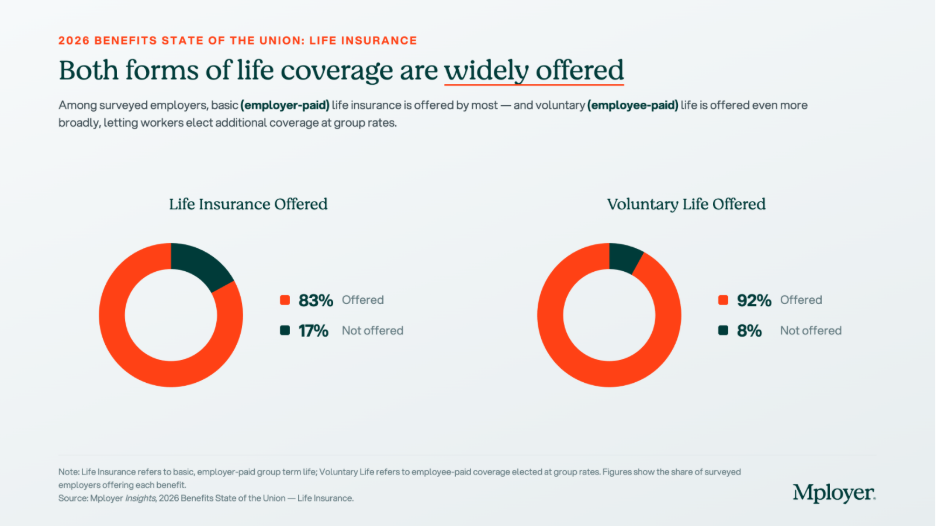
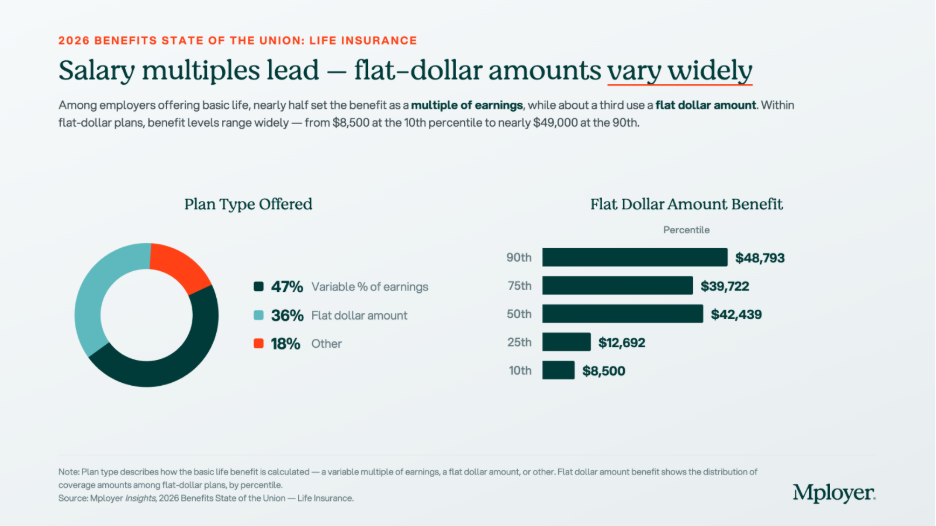
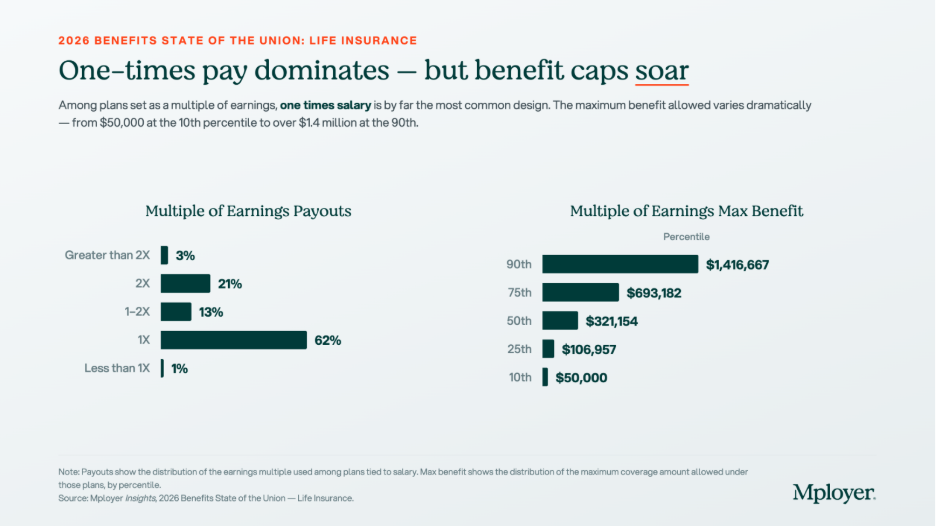
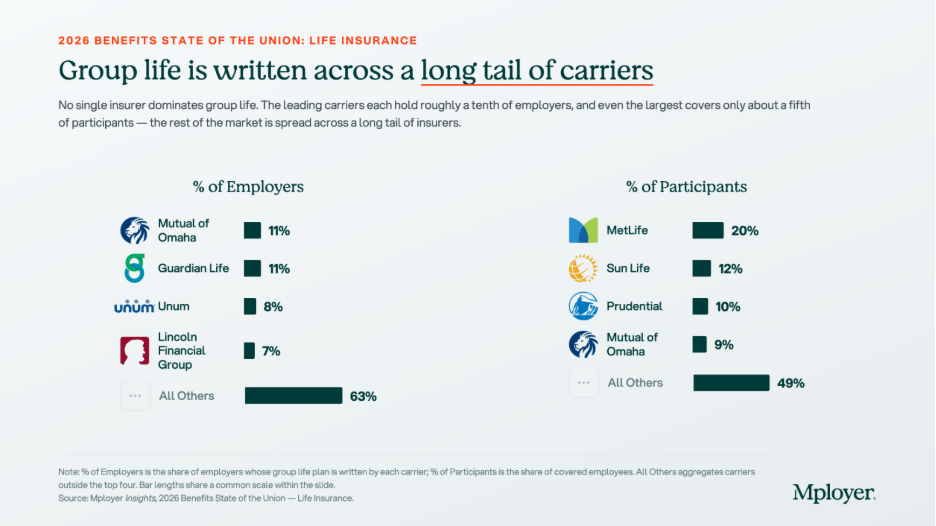
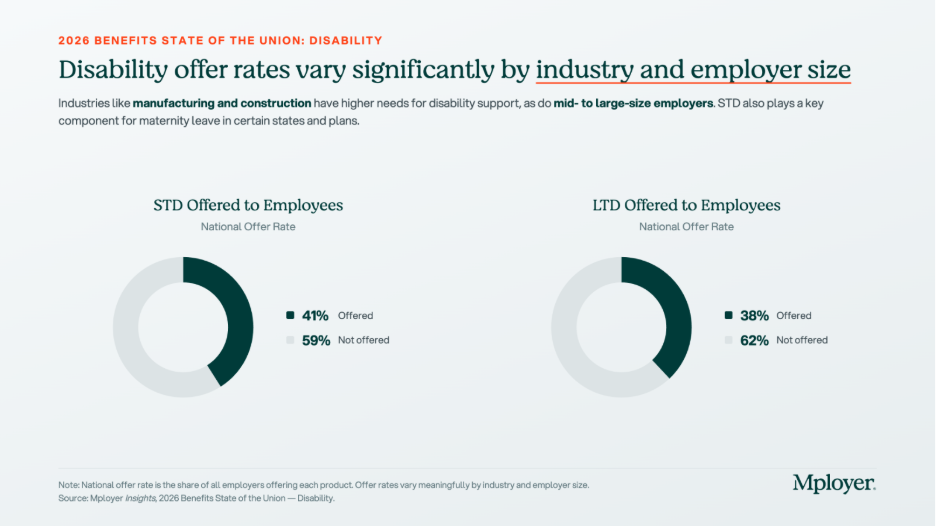
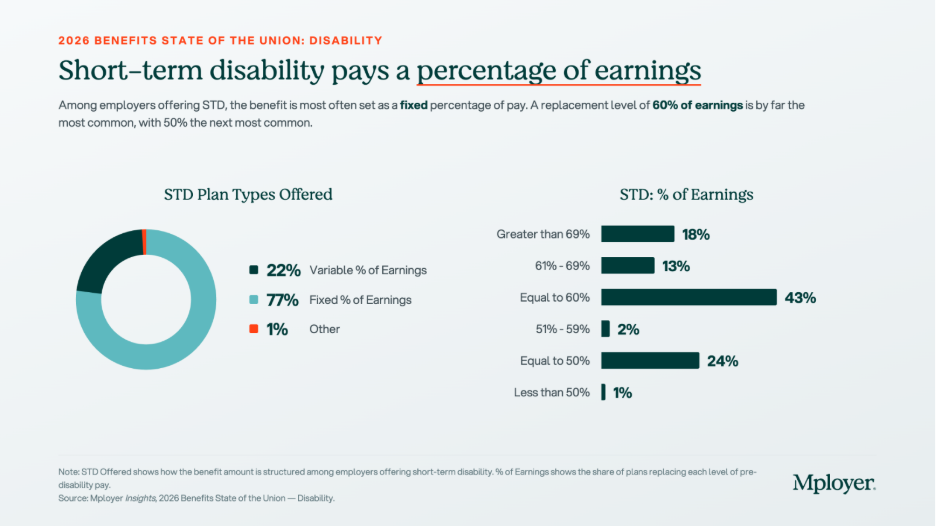
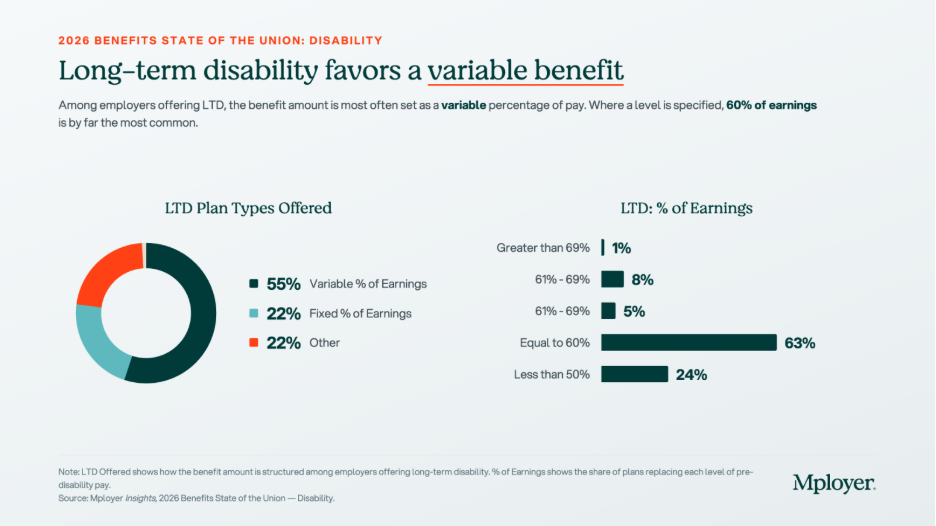
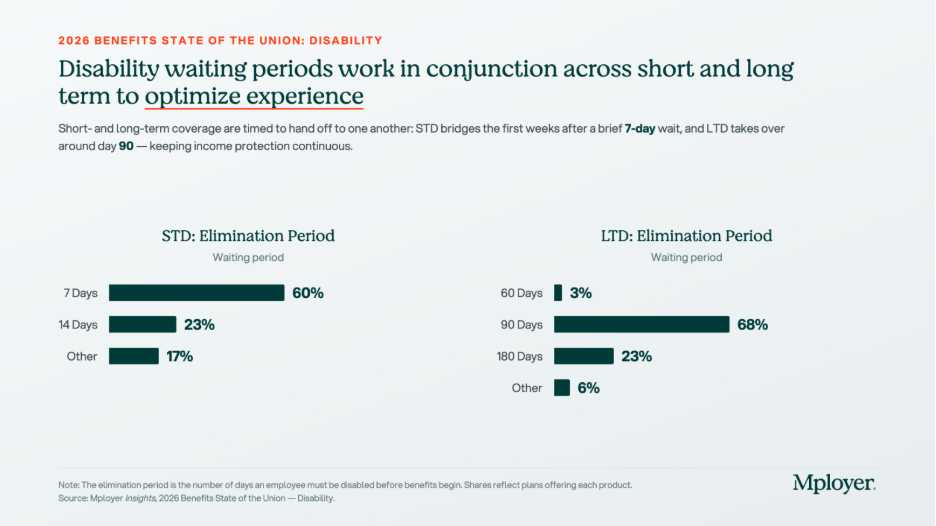
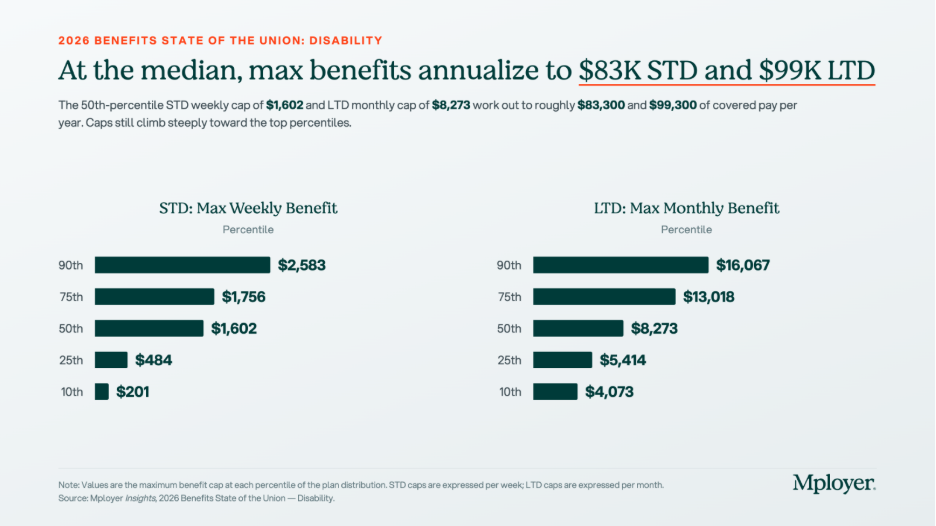
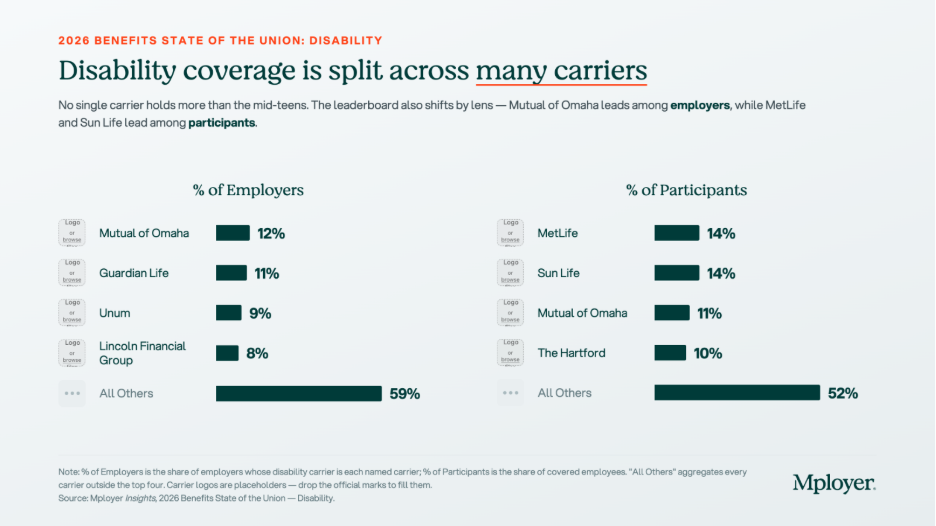
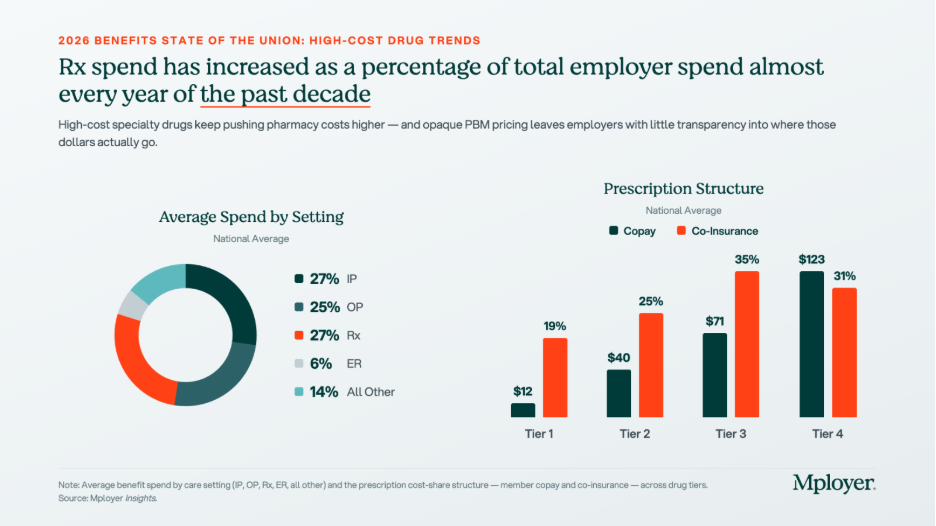
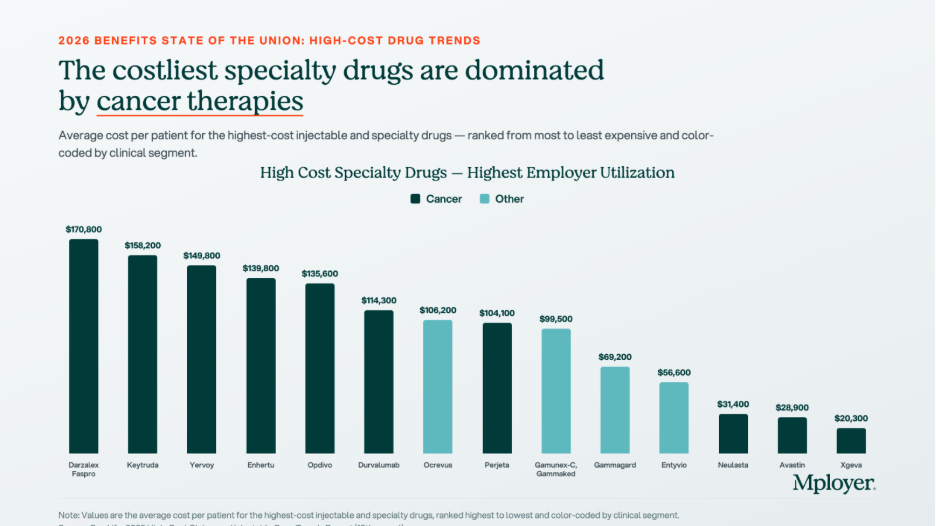
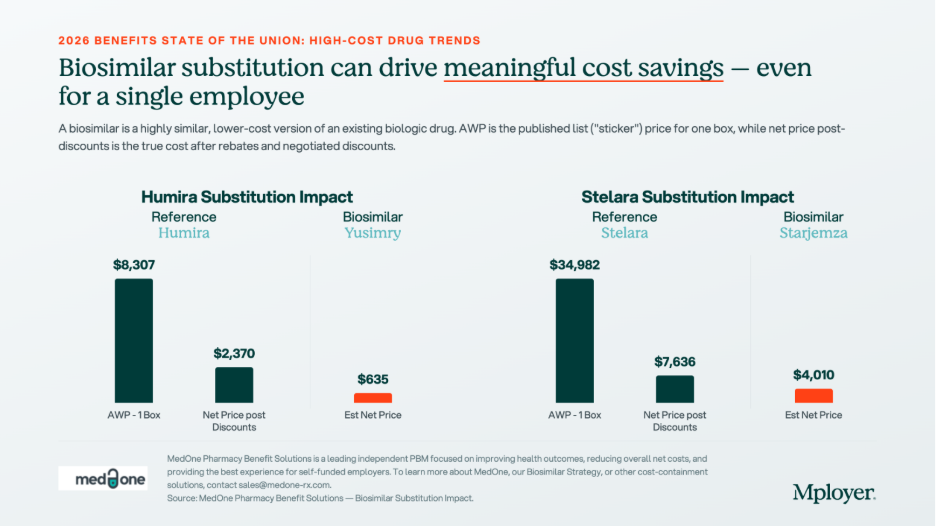


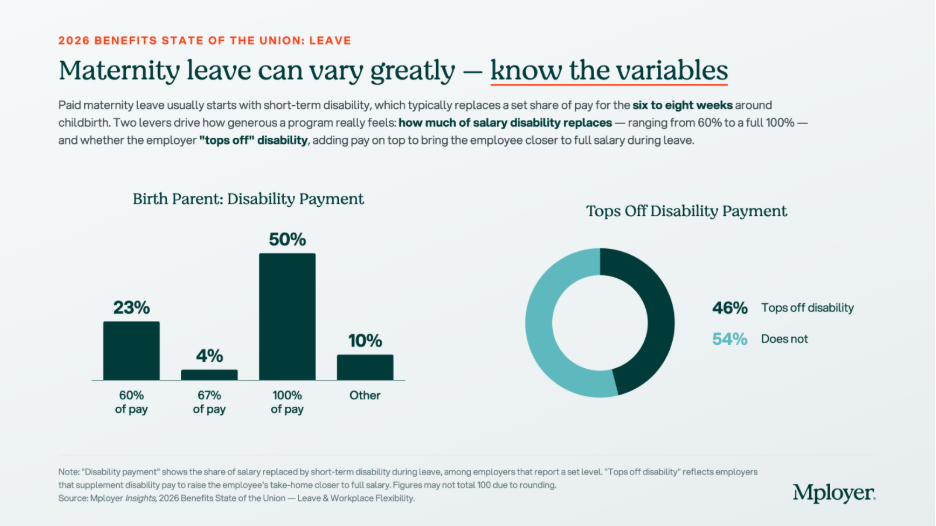


.svg)
.svg)