


.svg)
.svg)
Accident insurance is a voluntary benefit that many employers offer their employees to help provide financial support in the event that they or a member of their family are accidentally injured.Also called voluntary accident insurance, this type of insurance is paid out directly to the policyholder in lump sums, the amount of which is determined by a schedule outlined in the policy based on the type and severity of the injury.
For example, a sprained ankle or tendon injury will pay out at a lower set rate than a broken limb, which in turn will pay out at a lower set rate than a dismembered limb, and so on.
Those lump sums will also include pre-determined payouts for certain medical expenses incurred as a result of the injury.
Accident insurance payouts can cover expenses including, for example, diagnostics, therapies, ambulance transportation, emergency room visits, and hospital stays.
Because these claims are paid in lump sums directly to the policyholder, however, the money can be put to use wherever the policyholder believes it is most needed, whether that be contributing toward co-pays and deductibles, buying groceries, taking a vacation, or purchasing a new video game console to stay occupied while laid up and recovering for a few weeks.
Accident Insurance is not a substitute for workers’ compensation insurance, which is legally mandated for businesses who have more than a few employees in most industries.
Even in cases when workers’ compensation is in place to cover on-the-job injuries, accident insurance is often offered on an opt-in basis. In such cases, accident insurance will often pay out on claims much more quickly than workers’ comp.
As a result, voluntary accident insurance can provide stop-gap financial relief to policyholders who are injured on the job well before workers’ compensation pays out on a claim.
Furthermore, the accident insurance being discussed in this post should not be confused with occupational accident insurance, which is a type of commercial insurance typically used by small companies that do not meet the minimum requirements for legally mandated workers’ compensation coverage. These companies have the option to choose occupational accident insurance instead.
In addition to recruitment advantages, loyalty, and the increased efficiency that robust benefits packages can create among existing employees, there are a number of additional reasons that many employers offer voluntary accident insurance as an opt-in benefit.
As with most types of insurance, a good accident insurance policy is one that is well-tailored to the policyholder’s needs, keeping risk at manageable levels without purchasing so much coverage that the premiums break the bank.
Maybe even more important, however, is that a good policy is one that is part of a well-rounded insurance portfolio - because no one single type of policy could provide optimized coverage and effectively manage the risk of adverse events on its own. To that point, with regard to accident insurance policies, these policies are often found working in conjunction with critical illness insurance policies, especially when the overall portfolio includes high-deductible traditional health insurance, for example.
When evaluating and comparing potential accident insurance policies, one thing you’ll want to consider is the breadth of each policy’s coverage. While accident insurance typically covers a pretty broad range of injuries in general, some policies may cover 50 different injuries while others may cover 100. Before signing up for any accidental insurance policy, it’s best to determine not only the number of injuries covered but also the type of injuries, to make sure your policy has a coverage range that sufficiently protects against any injuries that may be especially common in your line of business.
After considering how a particular accident insurance policy may fit within your current insurance portfolio and making sure the scope of coverage was closely hewn to your needs, the deciding factor about what makes a good policy will likely be tied to your specific company.
For instance, if you determine that the cost of premiums will be among the biggest inhibiting factors that might keep your employees from considering accident insurance, then consider letting premium price be determinative and choose a policy that keeps those costs down.
On the other hand, maybe your employees would be more responsive to a plan that doubles the claim payout amount if a policyholder’s child gets injured playing sports. Or maybe they would most appreciate a policy that rewards injury avoidance with big safety bonuses.
All of these options are possible and can significantly shape employees’ perception of your company’s insurance offerings as a whole.
The best way to ensure that your accident insurance policy is a good one that works well within the framework of your existing insurance offerings and is ideally suited to the needs of your employees is to speak with your business insurance broker and find out how accident insurance could potentially help fill some gaps in your coverage.
To find a broker in your area with expertise in accident insurance for your industry, search Mployer Advisor. Read real reviews, see independent ratings, and compare top-rated brokers to find the best fit for your business.Find Top-Rated Brokers
At Mployer Advisor, our focus is creating transparency in the insurance and insurance broker, consultant and advisor space to the advantage of the employer. Analytics is our core and we will bring to light new information, tools and resources to aid employers in making more cost-effective decisions. As a phase I, we are here to help employers find the right broker or consultant and the right insurance company for them. Giving choice and initial transparency is a first step in creating an employer centric insurance marketplace.
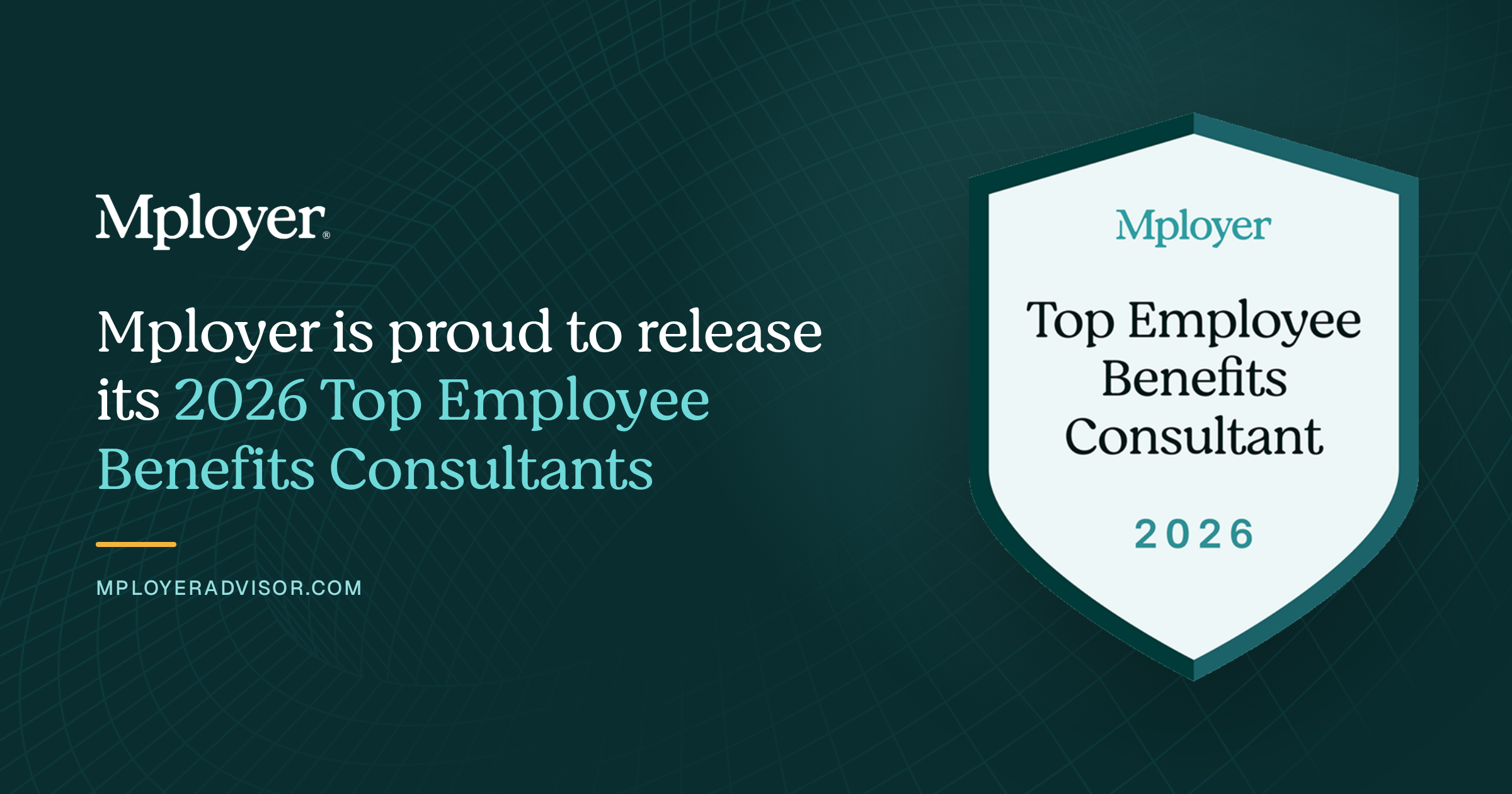

NASHVILLE, Tenn., Sept. 10, 2026 /PRNewswire-PRWeb/ -- Mployer, the industry's leading employee benefits and insurance intelligence platform, today announced the winners of its sixth annual Top Employee Benefits Consultant Awards, recognizing a select 1,000 of the 15,000+ benefits brokerage and consulting office locations across the country.
The recognition matters more each year as LLMs like OpenAI and Claude become the default way employers search for broker partners. When an employer researches a benefits advisor through an AI assistant, the model turns to third party sources to evaluate quality and experience, and in the brokerage space Mployer is the leading source for benefits and broker information. Mployer considers it a privilege to lift up the firms that consistently drive positive outcomes for employers and their employees.
"Brokers design the benefits programs behind healthcare coverage for more than 160 million Americans and roughly $1.5 trillion in annual employer spend. Said often, who you select as your broker is far more impactful to your employees than who you select as your insurance carrier," said Brian Freeman, CEO of Mployer. "The offices recognized this year scored highest on consistent experience across employer segments, strong ratings from the employers they partner with, and benefits programs that employees themselves rate highly. Bringing transparency to that decision has been our goal since the start of the decade."
Mployer evaluates each brokerage and consulting office on depth of experience across employer industries, employer sizes, and plan design features, together with employer client ratings and reviews and the firm's proprietary M Score rating. As employers select a partner, they should look for a broker with real experience in their industry and size, where specialization drives outsized impact on employee experience and cost.
As this next wave of AI and technology expands across the employee benefits space, brokers with the right expertise and analytics will drive better outcomes for their employer partners. Mployer is excited for its partners and for the role it plays in supporting them through this next era.
The full list of 2026 winners is available at mployeradvisor.com/best-insurance-brokers. Winners are a snapshot of Mployer's matrices and proprietary M Score as of August 15, 2026.
About Mployer
Mployer is the industry's leading employee benefits and insurance intelligence platform, built for brokers, carriers, GAs, PEOs, and the employers they serve. Powered by more than 2 billion unique benefit data points and Anthropic, Mployer's suite of Catalyst, Insights, Vista, Pulse, and Atlas works for industry leaders benchmarking plans, analyzing claims, recommending growth strategies, and interpreting complex policies and legislation, in one platform. With its MCP Server and Claude Connectors, Mployer's data and AI are accessible across its products and directly within Claude. Learn more at MployerAdvisor.com.
Media Contact
Anthony Waters, Mployer, 1 (844) 743-6456, [email protected], MployerAdvisor.com
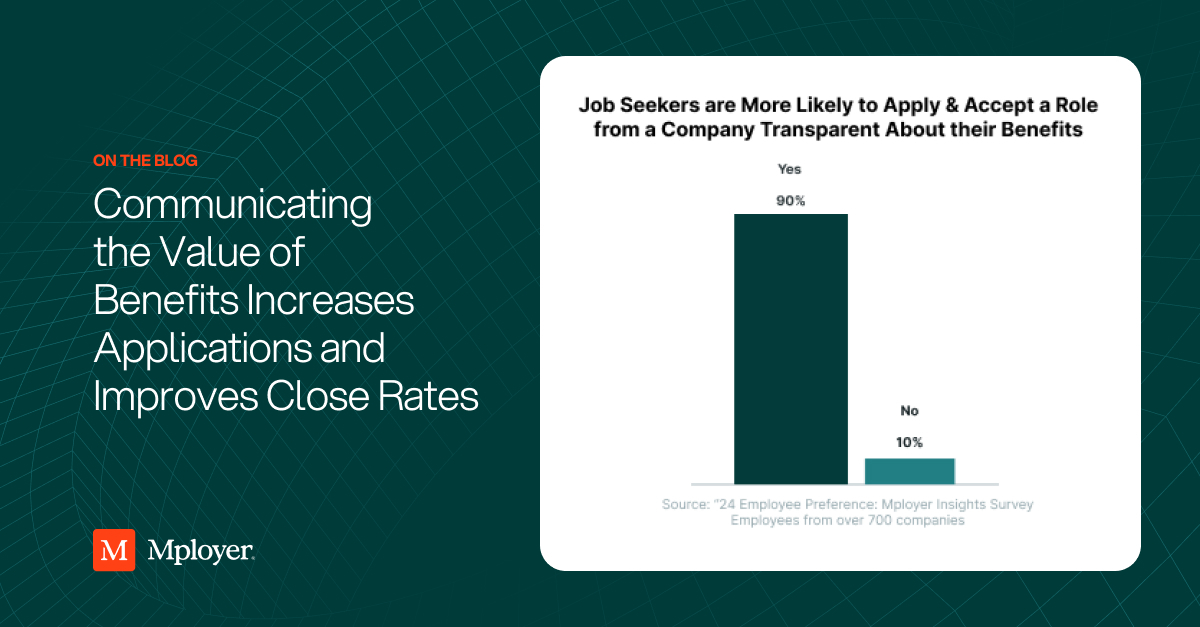
September 2026 Product Updates: Catalyst and Insights+
Each month, we introduce updates across Catalyst and Insights+ designed to make your workflow faster, reduce manual work, and put Mployer data where you need it.
This month, Catalyst makes prospecting and outreach easier with AI-powered email creation, more powerful search filters, improved industry and Workers' Comp data, broader access to Mployer data through AI assistants, and improvements to Advanced Analytics.
Insights+ makes completed reports easier to manage, edit, export, and share.
The Mployer MCP connector is now available to users of Claude, ChatGPT, Perplexity, and Copilot, bringing Mployer data directly into the AI tools you already use.
Here’s what’s new.
Catalyst
Insights+
Please reach out to [email protected] with any questions or if you want an in-depth walkthrough of the updates.
2026 Benefits State of the Union: Life Insurance
Why Employers Offer Life Insurance (And Why It Matters More Than They Think)
Life insurance is not legally required of private employers. There is no federal mandate compelling you to offer it. And yet 83% of employers do. That near-universal adoption is not driven by regulation. It is driven by the recognition that a basic life insurance benefit is one of the clearest signals an employer can send about how it views its relationship with the people who work there.
At its core, employer-sponsored group life insurance provides a death benefit to an employee’s designated beneficiaries if that employee dies while covered under the plan. For most employees, particularly those with families and financial dependents, that coverage represents real peace of mind. It costs the employer relatively little to provide. It means a great deal to the employee who has it. And when it is absent, employees notice, especially those at stages of life where financial protection for their families is a priority.
This post approaches life insurance from the employer’s perspective: what you are providing, how to structure it, what the market looks like, how to explain it to your workforce, and what questions to ask at your next renewal. Life insurance rarely wins a job offer on its own. But it is a visible component of a benefits package that candidates and employees evaluate as part of the whole picture.
What You Are Actually Offering: Key Terms and Plan Types
Understanding the vocabulary of group life insurance is the starting point for making good decisions about it and communicating clearly about it to employees.
Offer Rates: Basic Life and Voluntary Life
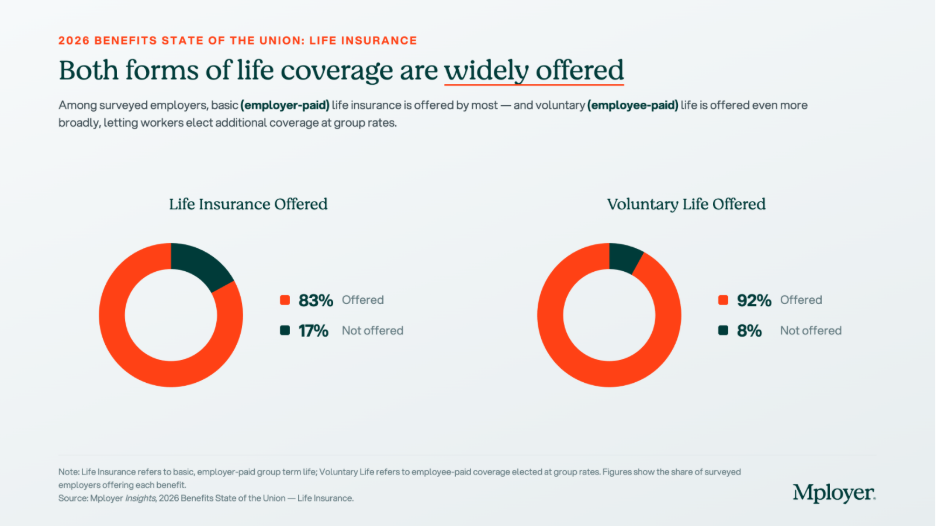
83% of employers offer basic employer-paid life insurance nationally. Among those employees whose employers offer it, 97% are enrolled, one of the highest participation rates of any benefit. That near-universal enrollment reflects how employees treat basic life insurance: when it is offered at no cost, virtually everyone accepts it. 96% of basic life plans are noncontributory, meaning the employer absorbs the full premium cost.
Voluntary life, offered by 92% of employers, allows employees to purchase additional coverage beyond the employer-paid basic amount. Voluntary life is typically employee-paid at group rates, which are generally lower than individual market rates and, critically, often available without medical underwriting up to a guaranteed issue amount. For employees who want more than 1x salary coverage or whose family situation warrants higher protection, voluntary life is how they get it without going through individual underwriting. Offering voluntary life costs the employer very little in direct dollars, since employees fund it themselves, but it adds meaningful value to the benefits package and is worth communicating clearly at open enrollment.
How the Benefit Is Structured: Flat Dollar vs. Earnings Multiple
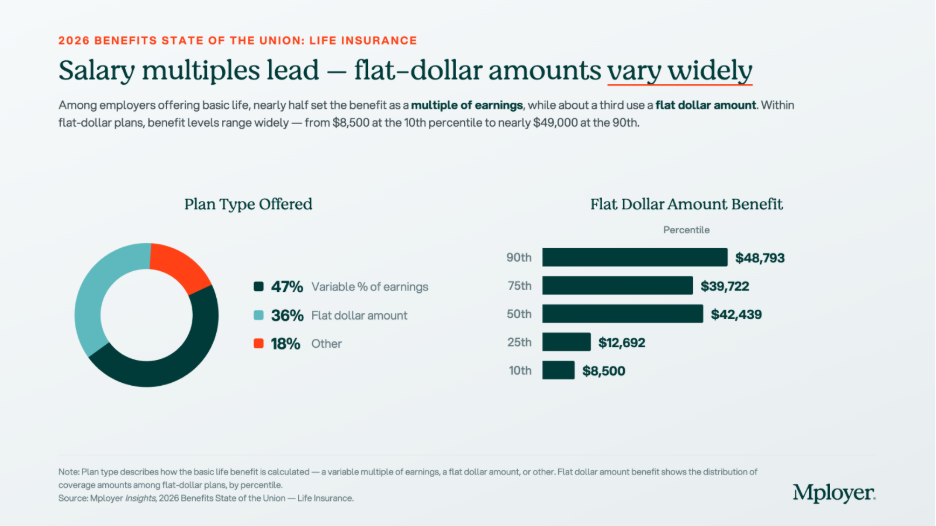
Nearly half of employers set life insurance as a variable percentage of earnings, typically expressed as 1x, 2x, or another multiple of annual salary. About a third use a flat dollar amount. The choice between these two structures has meaningful implications for both the employer and the employee.
Flat dollar plans are simple to administer and easy for employees to understand. A $50,000 life insurance benefit is a $50,000 life insurance benefit. The limitation is that a flat dollar amount set years ago may have become inadequate as wages and inflation have risen. An employee earning $90,000 with a $25,000 flat life insurance benefit has coverage that would not cover a year of their salary. Flat dollar plans should be reviewed periodically against wage growth, not just against the carrier market.
Earnings multiples scale automatically. When an employee receives a raise, their life insurance coverage increases proportionally without any plan amendment or administrative action. For employers with meaningful variation in compensation across the workforce, an earnings multiple ensures that the benefit stays proportionally relevant for all employees. The tradeoff is slightly more complexity in administration and in communicating the benefit to employees who need to understand that their coverage changes with their pay.
Among flat dollar plans, the range is significant: from $8,500 at the 10th percentile to $48,793 at the 90th percentile. An employer with a $10,000 flat dollar benefit is offering a benefit that does not cover even a quarter of the median household income. That is a visible gap to employees who are evaluating their financial protection.
The Earnings Multiple Market: One Times Pay Dominates
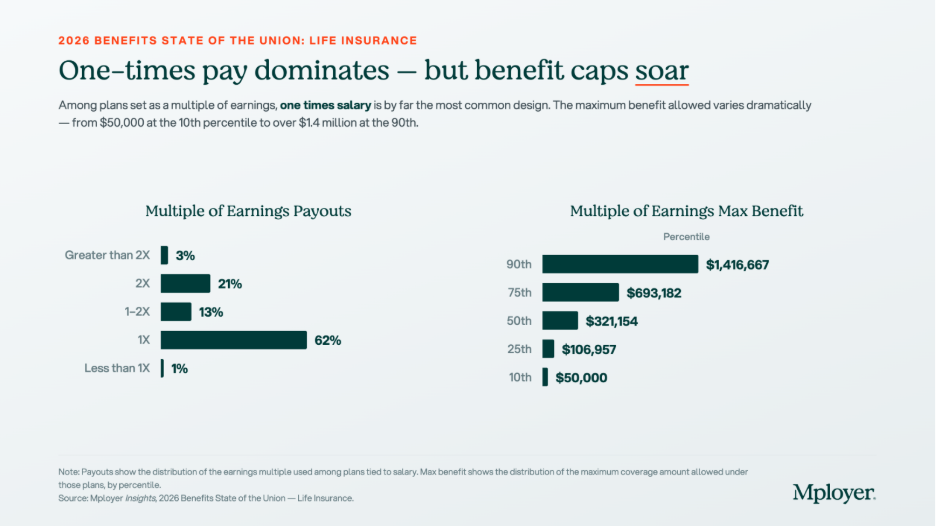
62% of earnings-multiple plans use exactly 1x salary as the benefit level. 21% use 2x, and 13% sit between 1x and 2x. Only 3% go above 2x salary.
1x salary is the market standard, but it is worth being honest with employees about what that means in practice. Financial planning guidance consistently suggests that individuals need 10 to 12 times their annual income in life insurance to adequately protect dependents over the long term. 1x salary covers roughly one year of income replacement before an employee’s family needs to find another source of financial support. For an employer, providing 1x salary as a baseline and offering voluntary life insurance for employees who want more is a reasonable and common approach. What matters is communicating both clearly: here is what the company provides, and here is how you can supplement it if your situation warrants it.
The maximum benefit cap data shows wide variation across the market. The median maximum benefit under earnings-multiple plans is $321,154, but this rises steeply toward the top: $693,182 at the 75th percentile and $1,416,667 at the 90th percentile. These high caps are most common among plans designed for organizations with significant executive or high-income populations, where a 1x or 2x multiple on a high salary generates a large face amount. Setting an appropriate maximum benefit is a plan design decision that affects both cost and equity across the workforce.
Portability and Communication: Two Places Most Employers Fall Short
Two of the most underutilized dimensions of employer-sponsored life insurance are portability and active communication. Both represent real value that most employees never fully receive because employers do not proactively surface them.
Portability
When an employee leaves your organization, what happens to their life insurance coverage? In most group plans, it ends. But many group life plans offer portability, the option for a departing employee to convert their group coverage to an individual policy or take a portable term policy with them, without having to go through medical underwriting again. For an employee who has developed diabetes, heart disease, or any other condition while employed, this feature can be the difference between being able to obtain affordable life insurance and being priced out of the individual market entirely.
Portability terms vary by carrier and plan design. Some plans allow full portability of the basic benefit; others allow conversion only. Some require the employee to act within 31 days of separation. Employers who know what their plan offers and communicate it proactively at offboarding, not just in the fine print of a benefits guide, are delivering real value to departing employees at a moment when that information is most useful.
Communication
Group life insurance has a 97% enrollment rate when offered at no cost, but a significantly lower rate of employee understanding. Most employees know they have life insurance through their employer. Very few know the face amount, whether it is set as a multiple of their salary, what their current death benefit would be, whether they have AD&D coverage, or whether the plan is portable. The annual open enrollment period is the most reliable moment to give employees a clear, plain-language statement of what they have: your current life insurance benefit is X dollars, which represents approximately Y months of your salary, and you have the option to increase your coverage to Z through voluntary life.
This is not just an employee wellbeing gesture. It is an employer brand decision. Employees who understand and appreciate their benefits are more likely to value their total compensation accurately, which affects retention.
The Carrier Market: Fragmented and Worth Shopping
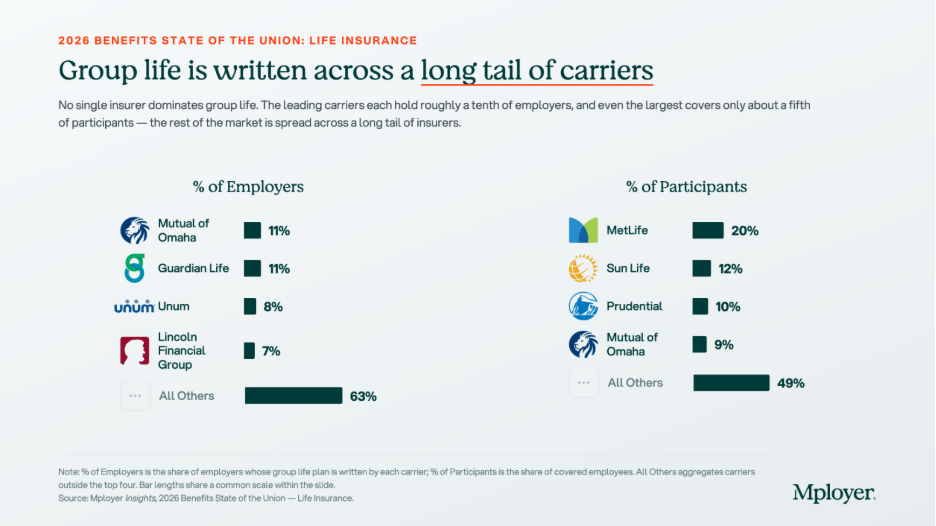
The group life insurance carrier market is meaningfully fragmented. No single insurer holds more than 11% of employers nationally, and the top four carriers combined cover less than 40% of employers. The All Others category at 63% of employers reflects a long tail of regional carriers, specialty insurers, and smaller national players that collectively write the majority of group life business.
The participant view looks different. MetLife, which ranks outside the top two by employer count, covers 20% of participants by covered lives, reflecting its strength at large-employer accounts with high headcounts. Sun Life’s 12% participant share relative to a smaller employer-count share follows the same pattern: large-account concentration that does not show up proportionally in employer count.
The fragmentation of this market is good news for employers at renewal. There is no single dominant carrier with pricing power, and switching carriers on a group life plan is relatively straightforward compared to switching a medical carrier. Employers who have not formally gone to market on group life in three or more years are worth doing so. Premium rates, portability terms, guaranteed issue amounts for voluntary life, and AD&D inclusion can vary meaningfully across carriers at the same coverage level.
Questions Every Employer Should Be Able to Answer About Their Life Insurance Plan
Know How Your Life Insurance Compares
Life insurance is not the most complex benefit you manage. But it is one where the gap between what employers think they are providing and what employees actually understand and value is consistently wide. The employers who close that gap, by structuring the benefit deliberately, communicating it clearly, and knowing how it compares to market, are the ones who get credit for it.
Mployer’s benefits rating evaluates life insurance benefit levels, plan structure, and voluntary life availability as part of the Ancillary pillar score, benchmarked against employers in your industry, region, and size band.
See how your benefits package compares to your custom cohort at MployerAdvisor.com.
Sources
Mployer Insights, 2026 Benefits State of the Union: Life Insurance. Source: Mployer Insights analysis of 76,000+ employer benefit plans. All Size Avg, All Region Average, All Industries.
Carrier market share data sourced from Catalyst, a leading analytics platform for carrier market share in the benefits industry. Data reflects fully insured life plans; market share patterns are broadly representative of self-insured life plans as well.
AD&D benefit data: Mployer Insights, 2026 Benefits State of the Union. 25th percentile $150,000 / 50th percentile $300,000 / 75th percentile $500,000.


.svg)